Thoth Tech – Company Handover Report Trimester 3 2024
Table of Contents
- 5.1 Project Overview
- 5.2 User Manual
- 5.3 Completed Deliverables
- 5.4 Roadmap
- 5.5 Open Issues
- 5.6 Lessons Learned
- 5.7 Product Development Life Cycle
- 5.8 Product Architecture
- 5.9 Source Code
- 5.10 Login Credentials
- 6.1 Project Overview
- 6.2 User Manual
- 6.3 Completed Deliverables
- 6.4 Roadmap
- 6.5 Open Issues
- 6.6 Lessons Learned
- 6.7 Product Development Life Cycle
- 6.8 Product Architecture
- 6.9 Source Code
Executive Summary
Thoth Tech is an education-focused technology company located in Melbourne, Australia. Thoth Tech’s mission is to build, operate, and deploy tools that enhance education outcomes by empowering students, connecting them with tutors, and facilitating personalised learning experiences.
We value excellence and collaboration. We strive to deliver all our products in exceptional quality, making sure it is sustainable in the long run. We continuously meet this goal while empowering our people through established frameworks and a safe and supportive learning environment.
This report will outline the company structure, objectives, and projects for Trimester 3, 2024. This trimester, Thoth Tech will be running the two main products: OnTrack and SplashKit.
Showcase Video
This video summarises the accomplishments made at Thoth Tech for Trimester 3 2024: Thoth Tech Company Showcase Video
Leadership Team
Company Board
- Farah Farizi - Company Director
- Andrew Cain - Product Owner (OnTrack & SplashKit)
Product Mentors
- OnTrack: Nebula Alam & Satika Jayawardena
- SplashKit: Olivia McKeon, Sean Boettger & Tien Pham
Student Leadership
- Tan Tai Nguyen – Senior Leader (OnTrack)
- Brianna Laird – Senior Leader (SplashKit)
- Shaun Ratcliff – Senior Leader (SplashKit)
- Eswar Sivan Sethu – Senior Leader (SplashKit)
- Aditya Tomer – Junior Leader (OnTrack)
- Ashwini Deore – Junior Leader (OnTrack)
- Hirdyansh Dudi – Junior Leader (OnTrack)
- Shounak Bhalerao – Junior Leader (OnTrack)
- Rachel Chu – Junior Leader (SplashKit)
- Ethan Rin – Junior Leader (SplashKit)
- Vishnu Vengadeswaran – Junior Leader (SplashKit)
Leadership Responsibilities
The following are the key responsibilities of the company student leadership team throughout the trimester:
-
Company Presentation in the First Junior Lecture Introduce the company, its projects, and the required skill sets to inspire and recruit potential junior students.
- Presentation Preparation: Student leads must prepare and organise a PowerPoint presentation that effectively represents each of their projects during Week 0.
- Aligning with Goals: Clearly articulate how each project aligns with Thoth Tech’s goals, vision, and broader objectives within the capstone program.
- Highlighting Opportunities: Showcase the unique opportunities that being part of Thoth Tech provides, such as exposure to innovative projects, experienced mentors, and the chance to develop skills in real-world scenarios.
- Targeted Recruitment: Emphasise the qualities, skills, and mindsets the company values to attract the most motivated and capable junior students who can contribute meaningfully to the company’s objectives.
- Inspiring Participation: Use compelling visuals, project examples, and contributions from previous cohorts to inspire students and demonstrate the value of joining Thoth Tech.
- Engaging Delivery: Present in a way that connects with the audience, using a tone that is both professional and approachable, to ensure students feel welcomed and excited about the opportunity to join the company.
-
Host First Company-Wide Meeting and Onboard Students Provide a detailed overview of company and project goals, meeting schedules, and expectations for the trimester through a structured and inclusive onboarding process.
- Multiple Onboarding Sessions: Organise several onboarding sessions to ensure the widest possible audience is captured, accommodating different learning styles, time zones, and availability. This approach ensures that all junior students, regardless of their circumstances, receive the information they need to succeed.
- Consistent Structure and Delivery: Ensure consistency across all onboarding sessions by following a standardised agenda and delivery method. Assign experienced team members or senior leads to conduct these sessions, ensuring the same key messages and expectations are conveyed uniformly.
- Comprehensive Onboarding Materials: Provide clear, accessible onboarding materials, such as slide decks, documentation, and walkthrough videos, that junior students can refer back to after the sessions.
- Interactive Elements: Include interactive components, such as Q&A sessions, small group discussions, or hands-on demonstrations, to engage participants and help them better understand processes, tools, and workflows.
- Foster Team Building: Build rapport among team members and establish a positive and collaborative company culture from the start.
-
Weekly Company Leadership Team Meetings Facilitate regular meetings to report on project progress and address concerns with company stakeholders.
- Scheduling: Date and time to be decided by members in the first week according to availability.
- Rotating Leadership: Each week, a different member should take the lead in directing the meeting. Initially, senior members should guide these sessions to set the tone and structure, gradually handing off the responsibility to junior members as the trimester progresses. This approach fosters leadership development and prepares juniors for future roles.
- Structured Agenda: Ensure meetings follow a structured agenda with updates on project progress, blockers, and upcoming tasks, allowing for efficient use of time.
- Productivity Focus: Make meetings productive by assigning clear action items and deadlines, and ensuring all follow-ups are tracked and reviewed in subsequent sessions.
-
Project Mentorship and Guidance Actively support project teams by providing leadership, technical expertise, and problem-solving guidance to peers and junior team members alike.
- Mentor Peers and Juniors: Provide mentorship to both peers and junior team members, recognising that even senior contributors may require guidance and support to meet their objectives effectively.
- Champion Each Project: Act as champions for the projects under your leadership, advocating for their success in leadership meetings and ensuring they align with company goals.
- Resolve Blockers: Proactively identify and address blockers, facilitating solutions wherever possible. Escalate unresolved issues to ensure progress is not stalled.
- Promote Collaboration: Encourage cross-team collaboration by sharing insights, fostering knowledge exchange, and aligning project efforts with the overall vision of the company.
-
Communication and Collaboration Maintain clear and open communication across teams to align project goals, foster innovation, and enhance overall company contributions.
- Promote Cross-Team Collaboration: Actively encourage collaboration between teams, recognising that greater collaboration has historically helped overcome creativity blocks and inspired more innovative and exciting contributions across the company.
- Regular Updates: Provide consistent updates on project progress, challenges, and opportunities for alignment to ensure all teams are aware of each other’s work and can contribute to shared goals.
- Facilitate Knowledge Sharing: Create opportunities for knowledge exchange, such as collaborative sessions or showcases, to inspire creativity and strengthen the collective output of the company.
- Focus on Alignment: Ensure that all communication and collaborative efforts are aligned with the company’s broader objectives, creating a cohesive strategy that drives success.
- Designate a Communications Lead: Nominate one leadership member to act as the communications lead for the company. This individual will represent the leadership team by communicating key messages, updates, and announcements to the entire company through the main Thoth Tech channel. This ensures consistent and clear communication across all teams.
-
Complete Company Deliverables: Progress, Handover, and Showcase Reports and Videos Ensure timely and high-quality submissions of all required deliverables.
- Team Collaboration: Collaborate with project teams to gather insights, ensuring all deliverables include comprehensive updates that accurately reflect the progress and contributions of the entire company.
- Representation of the Company: Remember that as a leadership team member, you are representing the company. Ensure that the reports and videos serve as a voice for others in your teams, highlighting their achievements and aligning with the company’s overall goals and vision.
- Submission Responsibility: These reports must be submitted by 1 senior and 1 junior on behalf of the company, with appropriate communications made on Teams to ensure transparency and accountability.
-
Represent the Company in Leadership Meetings Advocate for the company’s needs and ensure alignment with the broader goals of the capstone program.
- Present Team Updates: Present the company’s progress, challenges, and successes in program-level leadership meetings, ensuring a clear and accurate representation of team activities.
- Voice Team Wins and Issues: Take responsibility for voicing both problems and achievements from the team, ensuring that concerns are addressed, and successes are celebrated.
- Communicate with Leadership: Use the opportunity to communicate with the company director and product owners to ensure that progress aligns with the overall company goals and vision.
- Build Relationships: Foster strong relationships with stakeholders and mentors to secure support and resources for company objectives.
-
Encourage Innovation and Best Practices Promote a culture of innovation, inclusivity, and continuous improvement within the company.
- Leverage Evidence-Based Decision-Making: Use the leadership team as a platform to analyse data, feedback, and outcomes to make informed and evidence-based choices that drive project success.
- Share Resources and Techniques: Share new tools, techniques, and resources to enhance project quality, fostering a culture of learning and adaptability.
- Empower Team Members: Encourage juniors and peers to take ownership of tasks, explore creative solutions, and contribute ideas that challenge the status quo.
- Foster Inclusivity: Promote an environment where all team members feel empowered to participate and contribute, ensuring diverse perspectives are considered in decision-making.
-
Foster Team Morale and Collaboration Actively support team morale and address interpersonal challenges to maintain a cohesive and motivated team environment.
- Celebrate Achievements: Recognise and celebrate individual and team accomplishments across the company to boost morale and reinforce a sense of achievement.
- Promote Inclusivity: Ensure that all voices are heard and valued, creating an inclusive environment where everyone feels comfortable contributing to discussions and decisions.
- Encourage Collaboration: Actively foster collaboration across teams by organising joint sessions, workshops, or brainstorming meetings to strengthen relationships and drive innovation.
- Be Approachable: As a leader, maintain an open-door policy where team members feel comfortable approaching you with concerns, feedback, or ideas for improvement.
By fulfilling these responsibilities, the leadership team ensures that Thoth Tech continues to grow, innovate, and succeed in achieving its objectives while fostering a collaborative and enriching environment for all contributors.
All past company reports, showcase videos, and relevant assets can be found here: Company Documents & Videos & Thoth Tech Documentation Website
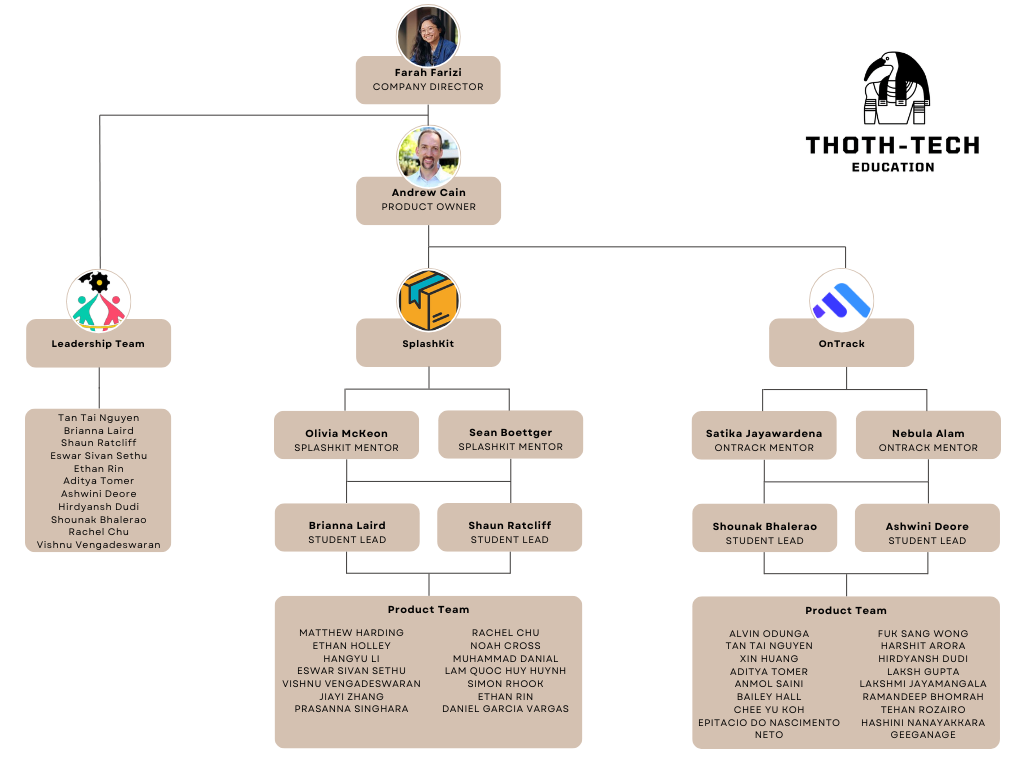
Company Structure
Project 1: OnTrack
Project Overview
OnTrack, also known as Doubtfire, is a sophisticated Learning Management System (LMS) tailored for skill-based course delivery. Developed for institutions such as Deakin University and other global educational entities, the platform facilitates seamless interaction between tutors and students, offering a structured and efficient learning environment.
Designed to enhance student engagement and improve learning outcomes, OnTrack prioritizes a practical, hands-on approach that aligns with the needs of contemporary education. It enables tutors to manage and deliver skill-based courses with ease while automating administrative tasks like grading and attendance, thus allowing educators to focus on teaching and providing personalized feedback.
The platform’s interactive features, including real-time progress tracking and feedback, support student motivation and engagement by providing insights into academic performance and identifying areas for improvement. In doing so, OnTrack not only fosters student development but also enhances the teaching process, making it an indispensable tool for modern educational institutions.
User Manual
Tutorial Videos on Setting Up Your Local Development Environment
-
T3 2023 Setup demo by Satika Jayawardena
-
T2 2023 Setup demo by Daniel Maddern
-
T1 2024 Common setup error solutions by Satika Jayawardena
Contributing Guides
Completed Deliverables
Document Website Expansion
- Conducted an in-depth audit and survey of current documentation. Identified gaps and created a backlog for Rails Backend.
- Updated documentation for the Frontend and Backend systems to ensure alignment with recent feature updates and new workflows.
- Integrated improved documentation for OnTrack’s related modules, streamlining the onboarding process for new developers.
Cyber Security Audit
- Conducted a comprehensive Web Security Audit, addressing vulnerabilities in areas such as:
- Broken Access Control
- Identification and Authentication Failures
- Security Misconfiguration
- Injection Attacks
- Vulnerable and Outdated Components
- Implemented fixes for critical vulnerabilities to enhance the platform’s overall security and reliability.
Feature Development
- Worked on implementing a Google Sign-In functionality, simplifying the user login process and enhancing authentication security.
- Developed a new visualization for Target Grades and Charts, improving analytics and reporting features for users.
- Added support for video uploads based on Panopto integration.
- Designed a Notification System Proof of Concept (PoC) to improve communication within the application, based on sending email when the tutor marks the submission as “resubmit.”
Migrate to Modern Codebase
- Worked to close the following Angular Migration tasks:
group-selector.coffeeproject-tasks-list.coffeegrade-icon.coffeeunit-staff-editor.coffeeunit-dates-selector.coffee
Documentation Improvement
- Linked API documentation with usage examples for seamless understanding and navigation.
- Enhanced the documentation backlog with detailed records and reference links for ongoing and future development tasks.
- Introduced new visualization elements in the documentation to make technical concepts more accessible to stakeholders.
- Enhanced Frontend Migration documentation.
- Created general setup documentation.
Backend Updates
- Worked on refactoring organization management, including site administrator logic and organization switch logic for improved performance.
- Introduced APIs for historical tracking of Target Grade changes, providing clear audit trails and data accuracy.
- Fixed a bug related to adjusting the automatic extension on “resubmit,” ensuring it is awarded one week from the date of feedback.
- Worked on ZIP File Upload and their subsequent presentation to the tutors.
List of Completed Deliverables
Roadmap
Working on implementing a Google Sign-In functionality, simplifying the user login process and enhancing authentication security.
Developed a new visualization for Target Grades and Charts, improving analytics and reporting features for users.
Adding support for video uploads based on Panopto integration.
Designed a Notification System Proof of Concept (PoC) to improve communication within the application, based on sending email when the tutor marks the submission as resubmit.
Documentation Website – Enhancement
Urgent Enhancements, Improvements, and Bugs
Frontend Migration – AngularJS and CoffeeScript to Angular and TypeScript
Open Issues
Git and GitHub Training
During the onboarding process, it is crucial for students to gain a strong understanding of Git and GitHub, as these tools are integral to the project. Students will be required to create pull requests and collaborate effectively within the repository.
To support this, the capstone project includes valuable resources such as Git and GitHub training websites and demo videos, which are attached to this document. These resources are designed to provide a comprehensive foundation in version control and project collaboration.
Familiarity with Planner Boards and Agile Methodology
It is essential for students to become proficient in using planner boards and understanding agile methodologies. One of the recurring challenges this trimester has been a lack of consistency in updating task cards and associating pull requests with corresponding tasks.
To address this, students must ensure they actively maintain and update planner boards, enabling the team to stay aligned and contribute effectively. This practice will promote smoother collaboration and more efficient project progress.
Lessons Learned
Mentorship and Leadership
Mentors were very helpful and guided us well, making sure we completed our tasks on time. However, many students didn’t attend mentor meetings, which made it hard for them to understand tasks and finish them. Attending these meetings is important to stay on track.
Planner Board and Task Updates
Students didn’t know how to use the planner board properly, so tasks and cards weren’t updated on time. This caused delays and confusion in the team. Learning how to use the planner board will help everyone stay organized and work together better.
Frontend Tasks and GitHub Knowledge
Many students struggled with front-end migration tasks because they didn’t know enough about GitHub or how to use it well. This delayed their work. Training on tools like Git and GitHub is very important so that tasks can be done faster and more easily.
Skill Growth and Learning
To meet project needs, students need to improve their skills regularly. Learning tools, time management, and problem-solving are key areas to focus on.
Time Management
Many tasks were delayed because students didn’t manage their time well. Creating clear plans, updating progress, and sticking to timelines can help avoid this in the future.
Product Development Life Cycle
We continue to use Agile methodologies to deliver updates and new features for OnTrack. Our approach includes 2-week sprints focused on completing tasks, and weekly stand-up meetings to assess progress, share updates, discuss roadblocks, and assign new tasks via Teams Planner cards.
New Tasks
New tasks are assigned by the project mentor during the weekly stand-up meetings. Once you are assigned a task, be sure to assign yourself to the corresponding Teams Planner card and attach your draft or completed pull request when you begin work.
If you have an idea for a new feature or enhancement, schedule a meeting with the project mentor to discuss it. Upon approval, create a new card or backlog column in Teams Planner to track the task. If the feature is large, start researching the benefits and challenges, and create a Spike document, which can be committed to the documentation repository.
Spike templates are available in the documentation repository.
Definition of Done
A task is considered complete once it has been fully tested, functions as expected, and is
documented in a well-organized pull request. The task must also undergo peer review and be approved
by your mentor. Ensure that the corresponding Teams Planner card is updated and keep in
communication with your reviewer and mentor until your contribution is merged into the upstream
doubtfire-lms repository.
Task Review
Each pull request requires a mandatory peer review before a mentor review. After creating the pull request, contact a teammate to review it. Tag them as the reviewer in both the Teams Planner card and the GitHub pull request.
As a reviewer, ensure that you test the code by pulling the changes locally and reviewing the syntax, logic, and output. If any changes are needed, update the contribution and notify the reviewer. Once the updates are made, the pull request will be automatically updated.
After the peer review is complete, notify the mentor for their review. Once approved, you can submit the pull request to the upstream repository for the final review.
Testing
For frontend changes, test the functionality in the browser or run specification tests as needed. For backend changes, use browser interactions or tools like Postman to test functionality. Additionally, GitHub CI Actions will run tests automatically when changes are pushed.
In the pull request template, include detailed instructions on how others can test your changes. Always provide before-and-after screenshots to show the outcome of your modifications.
Branching Strategy
When starting a new contribution, fork all three thoth-tech repositories (deploy, web, and
API) to your GitHub profile. Create a new branch from the development branch of the relevant
repository. For example, for frontend migrations, you would create a branch from the doubtfire-web
development branch.
Follow the Branch Prefixes and Commit Message Format in the Contributing Guide when naming branches and creating commits.
Product Architecture
OnTrack is built using four main components:
- Frontend Client: Responsible for user interactions
- Backend API: Handles requests and serves data
- Database: Stores application data
- Deployment Infrastructure: Ensures that OnTrack is properly deployed and maintained
Tech Stack
-
Frontend: Currently being migrated from AngularJS and CoffeeScript to Angular 17 and TypeScript. The stack also includes HTML, SCSS, and Tailwind CSS.
-
Backend: Built on Ruby on Rails with the Grape Framework. It uses MariaDB as the database engine. Docker is used for deployment and local development.
Source Code
The following are the relevant GitHub repositories to this project:
- Deployment: thoth-tech/doubtfire-deploy
- Frontend: thoth-tech/doubtfire-web
- Backend: thoth-tech/doubtfire-api
- OnTrack Documentation Website: thoth-tech/doubtfire-astro
- Documentation: OnTrack Documentation
- Templates: Templates Documentation
- Course Flow documentation: CourseFlow Docs
Login Credentials
Refer to the Working with Dev Containers section of the Contributing Guide for authentication credentials for locally deployed OnTrack.
Project 2: SplashKit
Project Overview
SplashKit is a versatile and user-friendly programming framework designed to introduce students to programming through the engaging process of 2D game development. Primarily coded in C++, SplashKit also supports a variety of other languages, including C#, Python, Pascal, and, more recently, JavaScript.
The SplashKit Software Development Kit (SDK) offers seamless integration with popular development environments, enabling the easy incorporation of robust graphics and game development capabilities into projects. With a single codebase, developers can create games and applications that run across multiple platforms, including Windows, macOS, and Linux. The SplashKit SDK is renowned for its intuitive interface and a comprehensive set of features that streamline the game development process.
Additionally, SplashKit provides an extensive array of detailed documentation and tutorials, designed to help students get started quickly and maximise their use of the SDK. This wealth of resources empowers learners to progress at their own pace and fully explore the capabilities of SplashKit, making it an invaluable tool for both beginners and more advanced users.
SplashKit ran the following projects during T3 2024:
SplashKit Website & Tutorials
Powered by the Starlight framework, the revamped SplashKit website aims to offer an enriched and user-friendly experience for developers and learners. The SplashKit Website will also feature tutorials aimed at helping students learn and explore SplashKit’s functionality. The focus is on developing smaller, high-quality tutorials across C++, C#, and Python, rather than extensive series.
SplashKit Expansion
The Expansion team is responsible for maintaining and enhancing the SplashKit core. This includes bug fixes, feature improvements, and refining installation and usage workflows through package creation and addressing installation issues.
SplashKit Online
SplashKit Online is developing a web-based IDE that allows students to write and run code directly in their browsers. Initially launched as a prototype in 2023, the 2024 goal is to mature this tool into a comprehensive product, including C# support and an embeddable version for the SplashKit website.
SplashKit also has two other main lines of effort, however these did not be run in T3 2024:
Arcade Machines
The university has acquired four arcade machines equipped with Raspberry Pi 3B+ units, designed to showcase games developed with SplashKit. The short-term goal is to prepare these platforms for students to display their SplashKit creations. The medium-term goal is to streamline the process for first-year students to easily upload and test their games.
Game Development
The Game Development team is dedicated to creating and enhancing games that run on the arcade machines. Their mission is to demonstrate SplashKit’s capabilities and inspire students by showcasing what can be achieved with the framework.
User Manual
A suite of resources for getting started with SplashKit can be found on the SplashKit Product Page of the Thoth Tech Documentation site. The below details some specific contributing documents that sit in the repositories for the relevant teams.
Arcade Machines
SplashKit Website & Tutorials
SplashKit Expansion
Game Development
SplashKit Online
Completed Deliverables
SplashKit Expansion
Ray-Tracing and Collision Functions
-
Bitmap and Sprite Ray Collision Functions: Enabled advanced ray-tracing in 2D and 3D environments with bitmap-ray and sprite-ray collision detection for more complex visual effects.
-
Ray Intersection Functions for Primitive Shapes: Added ray intersection functions for rectangles, circles, triangles, and quads, providing detailed intersection data or Boolean results for ease of use.
-
New Function -
quad_from: Developedquad_fromto construct a quad around a segment with a specified width, supporting advanced geometry operations. -
Collision Classification and Resolution Functions:
calculate_collision_direction: Classifies collision direction between objects.resolve_collision: Resolves overlap without altering velocities, supporting AABB and pixel collisions.
-
Additional Intersection Functions: Introduced functions for collision detection between different shape pairs:
circle_quad_intersect,rectangle_circle_intersect,triangle_quad_intersect.
-
Bug Fixes:
- Resolved the
bitmap_bounding_circlebug that impacted ray collision detection. - Fixed bug in
line_intersects_rectfor lines within rectangles. - Corrected tangent point bug for accurate collision behaviour.
- Resolved the
Particle System
-
Dynamic Particle Emission: Emit particles from a circular area, supporting both continuous and burst emission modes for diverse effects. Add randomness to particle size, speed, and direction for natural, less uniform effects, enhancing realism in particle-based simulations.
-
Lifespan and Removal Management: Configure individual particle lifespans in milliseconds. Automatically removes expired particles to ensure memory optimization. Detect and remove particles that move off-screen, maintaining performance without manual intervention.
-
Customizable Particle Appearance: Define static or varying particle sizes and colours, including support for gradient transitions over the particle’s lifetime. Smoothly fade particle opacity over time, creating elegant effects like smoke dispersal or spark dimming. Specify particle rendering order to prevent visual interference with UI or background elements.
-
Motion and Dynamics: Control particle speed and direction using an adjustable emission angle range. Simulate gravity or deceleration for lifelike motion dynamics, such as falling leaves or drifting snow.
-
Emitter and System Management: Dynamically reposition emitters, supporting static or relative positioning for moving objects (e.g., following a character). Manage multiple independent particle systems simultaneously, each with unique configurations and behaviors. Optimize performance by updating all particles in a system collectively.
-
Bug Fixes: Resolved issues with particle lifespan exceeding bounds, ensuring consistent removal at the correct time. Fixed off-screen particle cleanup to prevent memory leaks. Addressed visual glitches related to overlapping particles in layered rendering.
Code Quality and Performance Enhancements
-
Extensive Function Overloads: Developed 24 overloads for
calculate_collision_directionandresolve_collisionto ensure compatibility across all shape combinations. -
Precision Updates and Bug Fixes:
- Updated sprite, geometry, and point methods for better precision (using
doubleinstead offloat). - Fixed bugs in sprite collision and geometry functions, ensuring correct calculations at edges and corners.
- Fixed a bug in Python for
replace_alldue to the parameter name.
- Updated sprite, geometry, and point methods for better precision (using
-
Code Duplication Reduction: Minimized redundant code using void pointers and downcasting techniques, improving code maintainability despite added complexity.
-
Proposed Refactor for OOP Approach: Suggested refactoring SplashKit to adopt an OOP approach for better code structure, improving debugging and maintainability.
Testing and Documentation
-
Comprehensive Unit Tests: Developed unit tests for sprites and geometry methods, ensuring the robustness and reliability of core functions.
-
Updated Geometry Methods: Added and refined unit tests for geometry functions, addressing precision issues and improving documentation clarity.
-
Documentation Overhaul:
- Improved clarity of method descriptions, especially for edge cases (e.g.,
closest_point_on_circle). - Updated documentation for accuracy in sprite collision and geometry operations.
- Improved clarity of method descriptions, especially for edge cases (e.g.,
Input Validation and Conversion Functions
-
New Input Validation Functions:
is_binary,is_hex,is_octalfor validating number formats.
-
New Conversion Functions: Added conversion functions to handle various numeric and encoding formats:
dec_to_bin,bin_to_dec,hex_to_bin,bin_to_hex,oct_to_dec,dec_to_oct,hex_to_ct,ct_to_hex,base64_encode,base64_decode.
-
Mathematical Functions: Introduced foundational mathematical functions:
calculate_square_root,is_prime_number,greatest_common_divisor,least_common_multiple.
Networking and Address Functions
-
IPv4 Address Validation:
- Added a new function
is_valid_ipv4to validate IPv4 addresses using regex.
- Added a new function
-
MAC Address Conversion:
- Added
mac_to_hexandhex_to_macfor MAC address conversions between hexadecimal and standard MAC format.
- Added
SplashKit Website & Tutorials
-
Usage Example Generation Script Fixes:
- Resolved bugs in the usage example generation script, resulting in a more efficient development process.
-
Expanded Usage Examples:
- Significantly expanded usage examples across various categories, enhancing the site’s quality. Additions include comprehensive examples for Graphics and Geometry functions, along with completed examples for Physics, Utilities, and Terminal functions.
-
API Documentation Linkage:
- Linked API documentation pages to their corresponding usage examples, improving user experience and site navigation.
- Seamlessly linked function in the API documentation pages to their use cases in tutorials anad guides for easier navigation across resources.
-
Documentation Overhaul:
- Overhauled the SplashKit documentation pages with a reorganized structure and new usage example guides to enhance accessibility and usability.
-
Enum Syntax Support Across Multiple Languages:
- Added support for displaying enum syntax across multiple languages on the website, improving accessibility for diverse users.
-
Updated README Files:
- Updated multiple README files with additional information and a more structured format to improve clarity.
-
SplashKit Blog:
- Introduced the SplashKit Blog as a proof of concept to centralize updates and news, enhancing accessibility for users.
-
Updated Installation Guides:
- Updated installation guides to streamline the process and added support for multiple Linux distributions. Expanded VS Code installation guides now include Python-specific extensions.
-
Python Developer Tools:
- Added Python tools to language-specific pages for all operating systems, broadening support for Python developers.
-
Linux Compatibility Fixes:
- Addressed a Linux bash/zsh compatibility issue on the troubleshooting page, improving overall flow and usability.
-
Community Engagement Tools:
- Established a blog and contributor resources to encourage community feedback and tutorial contributions.
-
SplashKit Online Integration:
- Integrated SplashKit Online into the Usage Examples pages.
- A dedicated SplashKit Online feature page has also been added to allow users to directly interact with SplashKit Online.
- Created a SplashKit Online component for tutorials, allowing it to be incorporated into existing and future tutorial pages.
-
Custom Accordion Button:
- Added a custom accordion button that allows users to add their own content as a slot. Users can also apply custom styling to both the button and its content, offering greater flexibility and control over the presentation.
-
SplashKit Physics Tutorial Series Enhancements:
- Reviewed and adjusted existing physics tutorials to improve clarity, update content, and ensure alignment with project standards.
- Introduced 3 new raycasting tutorials:
- Basics
- Illumination
- 2D to 3D Projection
- Added
.cppfiles to simplify integration with corresponding.mdxfiles and enhance SplashKit Online functionality.
-
SplashKit vs No SplashKit Comparison Programs In Support of Beyond SplashKit Initiative:
- Added various programs to compare SplashKit versus No SplashKit versions including Math,
Cryptography, Graphics, and Audio.
- The SplashKit versions demonstrate the abstraction provided by the SDK to simplify complexity
- The No SplashKit versions show the underlying processes that occur in the backend when certain SplashKit functions are called, providing a deeper understanding of the SDK’s operations.
- Added a nested tab in the C++ section of the usage examples specifically for the Beyond SplashKit tutorials.
- Updated the CONTRIBUTING file to include guidelines for file naming conventions for Beyond SplashKit files:
- Added various programs to compare SplashKit versus No SplashKit versions including Math,
Cryptography, Graphics, and Audio.
-
Algolia DocSearch Integration:
- Integrated Algolia DocSearch into the SplashKit website for improved search functionality with custom ranking and new features to save recent and favourite results.
-
Colour Generation and Selection Tools:
- Colour Generator: A tool for visualising and generating precise RGB(A) and HSB colour values, with real-time visual feedback. The tool also provides corresponding SplashKit functions in C++, C#, and Python for easy integration.
- Colour Palette: An interactive tool displaying SplashKit’s predefined colours, allowing users to select colours and see how to implement them in their projects.
-
Create New Troubleshooting Page for MacOS: zshrc Issue:
- Addressed the ModuleNotFoundError issue by guiding users to update their .zshrc file to properly link to the Homebrew-installed Python version.
-
Tutorials Reviews:
- Various tutorials have been reviewed and updated to enhance their documentation and improve readability, making the guides more user-friendly.
SplashKit Online
-
Notification System Updates:
- Resolved visibility issues with compilation and runtime alerts, improving user experience by ensuring notifications remain visible throughout processes.
-
SplashKit Submodule Sync:
- Synced SplashKit Online’s submodule reference with the latest version of SplashKit, ensuring compatibility with the most recent features and bug fixes.
-
Action Queues Implementation:
- Implemented action queues to address concurrency issues, enabling synchronous execution of actions and enhancing stability within the IDE.
-
Project Loading via URL:
- Enabled users to load project zip files directly via a URL, simplifying project loading and improving ease of use for developers.
-
SplashKit Online IDE Integration:
- Integrated the SplashKit Online IDE into the main website, providing seamless access and interaction with the library directly from the site.
-
Load Time Improvements:
- Optimized loading times by storing pre-decompressed versions of assets, improving performance and user experience during project loading.
-
Autocomplete Functionality:
- Introduced autocomplete to assist developers in typing out functions and parameters, enhancing productivity and reducing coding errors.
List of Completed Deliverables
| Name | Type | Task Name | Task Attachment |
|---|---|---|---|
| Brianna Laird | Main Contributor | Complete Documentation Site Update | https://github.com/thoth-tech/ThothTech-Documentation-Website/pull/105 |
| Brianna Laird | Main Contributor | Complete overhaul of Installation and Troubleshooting Guides | https://github.com/thoth-tech/splashkit.io-starlight/pull/207 |
| Brianna Laird | Main Contributor | Updated Splashkit company READMEs | https://github.com/thoth-tech/.github/pull/7 https://github.com/thoth-tech/Asteroids/pull/12 https://github.com/thoth-tech/DXBallGame/pull/8 https://github.com/thoth-tech/SplashkitOnline/pull/91 https://github.com/thoth-tech/ThothTech-Documentation-Website/pull/106 https://github.com/thoth-tech/arcade-games/pull/240 https://github.com/thoth-tech/arcade-hackathon-project/pull/4 https://github.com/thoth-tech/arcade-machine/pull/81 https://github.com/thoth-tech/below-the-surface/pull/3 https://github.com/thoth-tech/skm/pull/14 https://github.com/thoth-tech/splashkit-beach/pull/3 https://github.com/thoth-tech/splashkit-core/pull/77 https://github.com/thoth-tech/splashkit-lake/pull/1 https://github.com/thoth-tech/splashkit-pond/pull/3 https://github.com/thoth-tech/splashkit.io-starlight/pull/212 |
| Brianna Laird | Main Contributor | Final Utilities Usage Example Creation | https://github.com/thoth-tech/splashkit.io-starlight/pull/288 |
| Brianna Laird | Main Contributor | Getting Started with Splashkit GPIO Tutorial - C# Language Update | https://github.com/thoth-tech/splashkit.io-starlight/pull/327 |
| Brianna Laird | Main Contributor | Reading button presses Tutorial - C# Language Update | https://github.com/thoth-tech/splashkit.io-starlight/pull/328 |
| Brianna Laird | Main Contributor | Resolve issue with usage example script generation | https://github.com/thoth-tech/splashkit.io-starlight/pull/255 |
| Brianna Laird | Main Contributor | Review “Reading JSON data” guide | https://github.com/thoth-tech/splashkit.io-starlight/pull/326 |
| Brianna Laird | Main Contributor | Review “Writing JSON data” guide | https://github.com/thoth-tech/splashkit.io-starlight/pull/325 |
| Brianna Laird | Main Contributor | Rnd Versions all 3 - Utility - Usage Example | https://github.com/thoth-tech/splashkit.io-starlight/pull/260 |
| Brianna Laird | Main Contributor | Terminal Usage Example Creation Part 1 | https://github.com/thoth-tech/splashkit.io-starlight/pull/289 |
| Brianna Laird | Main Contributor | Terminal Usage Example Creation Part 2 | https://github.com/thoth-tech/splashkit.io-starlight/pull/290 |
| Brianna Laird | Main Contributor | Trim - Utility - Usage Example | https://github.com/thoth-tech/splashkit.io-starlight/pull/261 |
| Brianna Laird | Main Contributor | Upper and Lower cases - Utility - Usage Example | https://github.com/thoth-tech/splashkit.io-starlight/pull/259 |
| Brianna Laird | Main Contributor | Usage Examples for JSON - Part 1 | https://github.com/thoth-tech/splashkit.io-starlight/pull/331 |
| Brianna Laird | Main Contributor | Usage Examples for JSON - Part 2 | https://github.com/thoth-tech/splashkit.io-starlight/pull/332 |
| Brianna Laird | Main Contributor | Usage Examples for JSON - Part 3 | https://github.com/thoth-tech/splashkit.io-starlight/pull/333 |
| Brianna Laird | Main Contributor | Usage Examples for JSON - Part 4 | https://github.com/thoth-tech/splashkit.io-starlight/pull/334 |
| Brianna Laird | Main Contributor | Contains - Utility - Usage Example | https://github.com/thoth-tech/splashkit.io-starlight/pull/210 |
| Brianna Laird | Main Contributor | Convert to Double - Utility - Usage Example | https://github.com/thoth-tech/splashkit.io-starlight/pull/208 |
| Brianna Laird | Main Contributor | Convert to Integer - Utility - Usage Example | https://github.com/thoth-tech/splashkit.io-starlight/pull/209 |
| Brianna Laird | Main Contributor | Delay - Utility - Usage Example | https://github.com/thoth-tech/splashkit.io-starlight/pull/262 |
| Brianna Laird | Main Contributor | Index of - Utility - Usage Example | https://github.com/thoth-tech/splashkit.io-starlight/pull/211 |
| Brianna Laird | Main Contributor | Adding Binary to IPv4 and Back Functions | https://github.com/thoth-tech/splashkit-core/pull/75 |
| Brianna Laird | Main Contributor | Function to Validate IP addresses | https://github.com/thoth-tech/splashkit-core/pull/78 |
| Brianna Laird | Main Contributor | MAC Address to Hex and Back | https://github.com/thoth-tech/splashkit-core/pull/79 |
| Brianna Laird | Main Contributor | Suite of Conversion Functions for SplashKit | https://github.com/thoth-tech/splashkit-core/pull/81 |
| Brianna Laird | Main Contributor | Beyond splashkit - Maths and Cryptography | https://github.com/thoth-tech/splashkit.io-starlight/pull/337 |
| Brianna Laird | Main Contributor | Configure the website to display enum languages | https://github.com/thoth-tech/splashkit.io-starlight/pull/268 |
| Brianna Laird | Main Contributor | Is integer - Utility - Usage Example | https://github.com/thoth-tech/splashkit.io-starlight/pull/217 |
| Brianna Laird | Main Contributor | Update Enums and Constants in the Translator | https://github.com/thoth-tech/splashkit-translator/pull/17 |
| Brianna Laird | Reviewer | Draw Rectangle on Window - Graphics - Usage Example Creation | https://github.com/thoth-tech/splashkit.io-starlight/pull/253 |
| Brianna Laird | Reviewer | Draw Line on Bitmap - Graphics - Usage Example Creation | https://github.com/thoth-tech/splashkit.io-starlight/pull/219 https://github.com/thoth-tech/splashkit.io-starlight/pull/227 |
| Brianna Laird | Reviewer | Draw Line on Window - Graphics - Usage Example Creation | https://github.com/thoth-tech/splashkit.io-starlight/pull/235 |
| Brianna Laird | Reviewer | Language Update - Basic Blue Circle Usage Example | https://github.com/thoth-tech/splashkit.io-starlight/pull/243 |
| Brianna Laird | Reviewer | Language Update - Basic Blue Ellipse Usage Example | https://github.com/thoth-tech/splashkit.io-starlight/pull/245 |
| Brianna Laird | Reviewer | Language Update - Clear screen Background Colour Usage Example | https://github.com/thoth-tech/splashkit.io-starlight/pull/244 |
| Brianna Laird | Reviewer | Language Update - Drawing a Player Sprite Usage Example | https://github.com/thoth-tech/splashkit.io-starlight/pull/233 |
| Brianna Laird | Reviewer | Language Update - Hex to Dec Converter Usage Example | https://github.com/thoth-tech/splashkit.io-starlight/pull/304 |
| Brianna Laird | Reviewer | Language Update - Ipv4 to Dec Converter Usage Example | https://github.com/thoth-tech/splashkit.io-starlight/pull/303 |
| Brianna Laird | Reviewer | Language Update - Printing Integers Usage Example | https://github.com/thoth-tech/splashkit.io-starlight/pull/213 https://github.com/thoth-tech/splashkit.io-starlight/pull/225 |
| Brianna Laird | Reviewer | Language Update - Simple Red Triangle Usage Example | https://github.com/thoth-tech/splashkit.io-starlight/pull/256 |
| Brianna Laird | Reviewer | Length of - Utility - Usage Example | https://github.com/thoth-tech/splashkit.io-starlight/pull/216 |
| Brianna Laird | Reviewer | Language Update - Create a Player Sprite Usage Example | https://github.com/thoth-tech/splashkit.io-starlight/pull/298 |
| Brianna Laird | Reviewer | Language Update - Setting Sprite X coordinate Usage Example | https://github.com/thoth-tech/splashkit.io-starlight/pull/301 |
| Brianna Laird | Reviewer | Language Update - Setting Sprite Y coordinate Usage Example | https://github.com/thoth-tech/splashkit.io-starlight/pull/302 |
| Brianna Laird | Reviewer | Set font style - Graphics - Usage Example Creation | https://github.com/thoth-tech/splashkit.io-starlight/pull/293 |
| Brianna Laird | Reviewer | Accordion Component Addition | https://github.com/thoth-tech/splashkit.io-starlight/pull/323 |
| Brianna Laird | Reviewer | Add onboarding guide for SplashKit Expansion | https://github.com/thoth-tech/ThothTech-Documentation-Website/pull/118 |
| Brianna Laird | Reviewer | Closest point on Circle - Geometry - Usage Example Creation | https://github.com/thoth-tech/splashkit.io-starlight/pull/322 |
| Brianna Laird | Reviewer | Draw Circle - Graphics - Usage Example Creation | https://github.com/thoth-tech/splashkit.io-starlight/pull/237 |
| Brianna Laird | Reviewer | Draw Circle on Bitmap - Graphics - Usage Example Creation | https://github.com/thoth-tech/splashkit.io-starlight/pull/226 |
| Brianna Laird | Reviewer | Draw Line - Graphics - Usage Example Creation | https://github.com/thoth-tech/splashkit.io-starlight/pull/246 |
| Brianna Laird | Reviewer | Draw Quad - Graphics - Usage Example Creation | https://github.com/thoth-tech/splashkit.io-starlight/pull/238 |
| Brianna Laird | Reviewer | Draw Triangle on Bitmap - Graphics - Usage Example Creation | https://github.com/thoth-tech/splashkit.io-starlight/pull/229 |
| Brianna Laird | Reviewer | Fill Ellipse on Window - Graphics - Usage Example Creation | https://github.com/thoth-tech/splashkit.io-starlight/pull/291 |
| Brianna Laird | Reviewer | Fill Quad - Graphics - Usage Example Creation | https://github.com/thoth-tech/splashkit.io-starlight/pull/240 |
| Brianna Laird | Reviewer | Fill Quad on Bitmap - Graphics - Usage Example Creation | https://github.com/thoth-tech/splashkit.io-starlight/pull/232 |
| Brianna Laird | Reviewer | Fill Quad on Window - Graphics - Usage Example Creation | https://github.com/thoth-tech/splashkit.io-starlight/pull/241 |
| Brianna Laird | Reviewer | Improve API reference to link tutorials and gudies | https://github.com/thoth-tech/splashkit.io-starlight/pull/282 |
| Brianna Laird | Reviewer | Improve API reference, with additional examples of usage | https://github.com/thoth-tech/splashkit.io-starlight/pull/266 |
| Brianna Laird | Reviewer | Is double - Utility - Usage Example | https://github.com/thoth-tech/splashkit.io-starlight/pull/214 |
| Brianna Laird | Reviewer | Language Update - Setting Sprite Position Usage Example | https://github.com/thoth-tech/splashkit.io-starlight/pull/250 |
| Brianna Laird | Reviewer | Point on Line - Geometry - Usage Example Creation | https://github.com/thoth-tech/splashkit.io-starlight/pull/280 |
| Brianna Laird | Reviewer | Point point distance - Geometry - Usage Example Creation | https://github.com/thoth-tech/splashkit.io-starlight/pull/281 |
| Brianna Laird | Reviewer | Point to string - Geometry - Usage Example Creation | https://github.com/thoth-tech/splashkit.io-starlight/pull/270 |
| Brianna Laird | Reviewer | Random bitmap point - Geometry - Usage Example Creation | https://github.com/thoth-tech/splashkit.io-starlight/pull/265 |
| Brianna Laird | Reviewer | Same point - Geometry - Usage Example Creation | https://github.com/thoth-tech/splashkit.io-starlight/pull/269 |
| Brianna Laird | Reviewer | Ticks - Utility - Usage Example | https://github.com/thoth-tech/splashkit.io-starlight/pull/215 |
| Brianna Laird | Reviewer | Add unit tests and fix bugs for geometry | https://github.com/thoth-tech/splashkit-core/pull/82/ |
| Brianna Laird | Reviewer | Add unit tests and fix bugs for sprites | https://github.com/thoth-tech/splashkit-core/pull/80 |
| Brianna Laird | Reviewer | Add object collision classification and resolution functions | https://github.com/thoth-tech/splashkit-core/pull/83 |
| Brianna Laird | Reviewer | Centre point - Geometry - Usage Example Creation | https://github.com/thoth-tech/splashkit.io-starlight/pull/318 |
| Brianna Laird | Reviewer | Draw Rectangle - Graphics - Usage Example Creation | https://github.com/thoth-tech/splashkit.io-starlight/pull/272 |
| Brianna Laird | Reviewer | Fill Ellipse - Graphics - Usage Example Creation | https://github.com/thoth-tech/splashkit.io-starlight/pull/249 |
| Brianna Laird | Reviewer | Random window point - Geometry - Usage Example Creation | https://github.com/thoth-tech/splashkit.io-starlight/pull/264 |
| Brianna Laird | Reviewer | Review “Loading Resources with Bundles” guide | https://github.com/thoth-tech/splashkit.io-starlight/pull/319 |
| Daniel Garcia Vargas | Main Contributor | Update splashkit-core submodule to latest SplashKit version | https://github.com/thoth-tech/SplashkitOnline/pull/97 |
| Daniel Garcia Vargas | Main Contributor | Draw Circle - Graphics - Usage Example Creation | https://github.com/thoth-tech/splashkit.io-starlight/pull/237 |
| Daniel Garcia Vargas | Reviewer | Improve run/compile program notifications | https://github.com/thoth-tech/SplashkitOnline/pull/99 |
| Eswar Sivan Sethu | Main Contributor | Particle System Frontend | https://github.com/splashkit/splashkit-core/pull/202 |
| Eswar Sivan Sethu | Main Contributor | Draw Rectangle on Window - Graphics - Usage Example Creation | https://github.com/thoth-tech/splashkit.io-starlight/pull/253 |
| Ethan Rin | Main Contributor | Language Update - Basic Blue Ellipse Usage Example | https://github.com/thoth-tech/splashkit.io-starlight/pull/245 |
| Ethan Rin | Main Contributor | Language Update - Dec to Hex Converter Usage Example | https://github.com/thoth-tech/splashkit.io-starlight/pull/248 |
| Ethan Rin | Main Contributor | Language Update - Fill Triangle on Bitmap Usage Example | https://github.com/thoth-tech/splashkit.io-starlight/pull/247 |
| Ethan Rin | Main Contributor | Algolia DocSearch Documentation | https://github.com/thoth-tech/ThothTech-Documentation-Website/pull/123 |
| Ethan Rin | Main Contributor | Tutorial JSON Files Documentation | https://github.com/thoth-tech/ThothTech-Documentation-Website/pull/117 |
| Ethan Rin | Main Contributor | Accordion Component Addition | https://github.com/thoth-tech/splashkit.io-starlight/pull/323 |
| Ethan Rin | Main Contributor | Improve API reference to link tutorials and gudies | https://github.com/thoth-tech/splashkit.io-starlight/pull/282 |
| Ethan Rin | Main Contributor | Improve API reference, with additional examples of usage | https://github.com/thoth-tech/splashkit.io-starlight/pull/266 |
| Ethan Rin | Main Contributor | Fill Ellipse - Graphics - Usage Example Creation | https://github.com/thoth-tech/splashkit.io-starlight/pull/249 |
| Ethan Rin | Main Contributor | Improve Search Functionality | https://github.com/thoth-tech/splashkit.io-starlight/pull/342 |
| Ethan Rin | Reviewer | Language Update - Basic Blue Circle Usage Example | https://github.com/thoth-tech/splashkit.io-starlight/pull/243 |
| Ethan Rin | Reviewer | Language Update - Clear screen Background Colour Usage Example | https://github.com/thoth-tech/splashkit.io-starlight/pull/244 |
| Ethan Rin | Reviewer | Fill Triangle - Graphics - Usage Example Creation | https://github.com/thoth-tech/splashkit.io-starlight/pull/314 |
| Ethan Rin | Reviewer | Usage Examples for JSON - Part 1 | https://github.com/thoth-tech/splashkit.io-starlight/pull/331 |
| Ethan Rin | Reviewer | Usage Examples for JSON - Part 2 | https://github.com/thoth-tech/splashkit.io-starlight/pull/332 |
| Ethan Rin | Reviewer | Usage Examples for JSON - Part 3 | https://github.com/thoth-tech/splashkit.io-starlight/pull/333 |
| Ethan Rin | Reviewer | Convert to Double - Utility - Usage Example | https://github.com/thoth-tech/splashkit.io-starlight/pull/208 |
| Ethan Rin | Reviewer | Convert to Integer - Utility - Usage Example | https://github.com/thoth-tech/splashkit.io-starlight/pull/209 |
| Ethan Rin | Reviewer | Delay - Utility - Usage Example | https://github.com/thoth-tech/splashkit.io-starlight/pull/262 |
| Ethan Rin | Reviewer | Draw Pixel - Graphics - Usage Example Creation | https://github.com/thoth-tech/splashkit.io-starlight/pull/276 |
| Ethan Rin | Reviewer | Fill Circle on Bitmap - Graphics - Usage Example Creation | https://github.com/thoth-tech/splashkit.io-starlight/pull/230 |
| Ethan Rin | Reviewer | Fill Circle on Window - Graphics - Usage Example Creation | https://github.com/thoth-tech/splashkit.io-starlight/pull/254 |
| Ethan Rin | Reviewer | Fill Ellipse on Bitmap - Graphics - Usage Example Creation | https://github.com/thoth-tech/splashkit.io-starlight/pull/231 |
| Ethan Rin | Reviewer | Index of - Utility - Usage Example | https://github.com/thoth-tech/splashkit.io-starlight/pull/211 |
| Ethan Rin | Reviewer | Is double - Utility - Usage Example | https://github.com/thoth-tech/splashkit.io-starlight/pull/214 |
| Ethan Rin | Reviewer | Line related functions - Geometry - Usage Example Creation | https://github.com/thoth-tech/splashkit.io-starlight/pull/329 |
| Ethan Rin | Reviewer | Point on Line - Geometry - Usage Example Creation | https://github.com/thoth-tech/splashkit.io-starlight/pull/280 |
| Ethan Rin | Reviewer | Random bitmap point - Geometry - Usage Example Creation | https://github.com/thoth-tech/splashkit.io-starlight/pull/265 |
| Ethan Rin | Reviewer | Add SplashKit Colour Guide | https://github.com/thoth-tech/splashkit.io-starlight/pull/343 |
| Ethan Rin | Reviewer | Configure the website to display enum languages | https://github.com/thoth-tech/splashkit.io-starlight/pull/268 |
| Ethan Rin | Reviewer | Fill Rectangle on Bitmap - Graphics - Usage Example Creation | https://github.com/thoth-tech/splashkit.io-starlight/pull/267 |
| Hangyu Li | Main Contributor | Draw Circle on Window - Graphics - Usage Example Creation | https://github.com/thoth-tech/splashkit.io-starlight/pull/257 |
| Hangyu Li | Main Contributor | Draw Triangle - Graphics - Usage Example Creation | https://github.com/thoth-tech/splashkit.io-starlight/pull/274 |
| Hangyu Li | Main Contributor | Draw Triangle on Window - Graphics - Usage Example Creation | https://github.com/thoth-tech/splashkit.io-starlight/pull/258 |
| Hangyu Li | Main Contributor | Text height - Graphics - Usage Example Creation | https://github.com/thoth-tech/splashkit.io-starlight/pull/300 |
| Hangyu Li | Main Contributor | Text width - Graphics - Usage Example Creation | https://github.com/thoth-tech/splashkit.io-starlight/pull/299 |
| Hangyu Li | Main Contributor | Circle Intersect version 1 - Geometry - Usage Example Creation | https://github.com/thoth-tech/splashkit.io-starlight/pull/335 |
| Hangyu Li | Main Contributor | Circle at - Geometry - Usage Example Creation | https://github.com/thoth-tech/splashkit.io-starlight/pull/317 |
| Hangyu Li | Main Contributor | Draw Ellipse - Graphics - Usage Example Creation | https://github.com/thoth-tech/splashkit.io-starlight/pull/271 |
| Hangyu Li | Main Contributor | Fill Rectangle - Graphics - Usage Example Creation | https://github.com/thoth-tech/splashkit.io-starlight/pull/296 |
| Hangyu Li | Main Contributor | Has font - Graphics - Usage Example Creation | https://github.com/thoth-tech/splashkit.io-starlight/pull/305 |
| Hangyu Li | Main Contributor | Point At - Geometry - Usage Example Creation | https://github.com/thoth-tech/splashkit.io-starlight/pull/311 |
| Hangyu Li | Main Contributor | Point at Origin - Geometry - Usage Example Creation | https://github.com/thoth-tech/splashkit.io-starlight/pull/312 |
| Hangyu Li | Main Contributor | Centre point - Geometry - Usage Example Creation | https://github.com/thoth-tech/splashkit.io-starlight/pull/318 |
| Hangyu Li | Main Contributor | Circle X - Geometry - Usage Example Creation | https://github.com/thoth-tech/splashkit.io-starlight/pull/316 |
| Hangyu Li | Main Contributor | Circle Y - Geometry - Usage Example Creation | https://github.com/thoth-tech/splashkit.io-starlight/pull/315 |
| Hangyu Li | Main Contributor | Circle radius - Geometry - Usage Example Creation | https://github.com/thoth-tech/splashkit.io-starlight/pull/313 |
| Hangyu Li | Main Contributor | Draw Rectangle - Graphics - Usage Example Creation | https://github.com/thoth-tech/splashkit.io-starlight/pull/272 |
| Hangyu Li | Main Contributor | Point point angle - Geometry - Usage Example Creation | https://github.com/thoth-tech/splashkit.io-starlight/pull/309 |
| Hangyu Li | Main Contributor | Draw Rectangle - Graphics - Usage Example Creation | https://github.com/thoth-tech/splashkit.io-starlight/pull/272 |
| Hangyu Li | Main Contributor | Draw Triangle - Graphics - Usage Example Creation | https://github.com/thoth-tech/splashkit.io-starlight/pull/274 |
| Hangyu Li | Main Contributor | Draw Triangle on Window - Graphics - Usage Example Creation | https://github.com/thoth-tech/splashkit.io-starlight/pull/258 |
| Hangyu Li | Main Contributor | Text height - Graphics - Usage Example Creation | https://github.com/thoth-tech/splashkit.io-starlight/pull/300 |
| Hangyu Li | Main Contributor | Text width - Graphics - Usage Example Creation | https://github.com/thoth-tech/splashkit.io-starlight/pull/299 |
| Hangyu Li | Reviewer | Current Clip - Graphics - Usage Example Creation | https://github.com/thoth-tech/splashkit.io-starlight/pull/341 |
| Hangyu Li | Reviewer | Pop Clip - Graphics - Usage Example Creation | https://github.com/thoth-tech/splashkit.io-starlight/pull/341 |
| Hangyu Li | Reviewer | Push Clip - Graphics - Usage Example Creation | https://github.com/thoth-tech/splashkit.io-starlight/pull/341 |
| Hangyu Li | Reviewer | Reset Clip - Graphics - Usage Example Creation | https://github.com/thoth-tech/splashkit.io-starlight/pull/341 |
| Hangyu Li | Reviewer | Set Clip - Graphics - Usage Example Creation | https://github.com/thoth-tech/splashkit.io-starlight/pull/341 |
| Hangyu Li | Reviewer | Draw Line - Graphics - Usage Example Creation | https://github.com/thoth-tech/splashkit.io-starlight/pull/246 |
| Hangyu Li | Reviewer | Draw Quad on Window - Graphics - Usage Example Creation | https://github.com/thoth-tech/splashkit.io-starlight/pull/239 |
| Hangyu Li | Reviewer | Fill Circle on Window - Graphics - Usage Example Creation | https://github.com/thoth-tech/splashkit.io-starlight/pull/254 |
| Hangyu Li | Reviewer | Fill Quad on Window - Graphics - Usage Example Creation | https://github.com/thoth-tech/splashkit.io-starlight/pull/241 |
| Hangyu Li | Reviewer | Fill Ellipse - Graphics - Usage Example Creation | https://github.com/thoth-tech/splashkit.io-starlight/pull/249 |
| Hangyu Li | Reviewer | Fill Rectangle on Window - Graphics - Usage Example Creation | https://github.com/thoth-tech/splashkit.io-starlight/pull/277 |
| Hangyu Li | Reviewer | Free Font - Graphics - Usage Example Creation | https://github.com/thoth-tech/splashkit.io-starlight/pull/297 |
| Hangyu Li | Reviewer | Point line distance - Geometry - Usage Example Creation | https://github.com/thoth-tech/splashkit.io-starlight/pull/295 |
| Hangyu Li | Reviewer | Update Splashkit Sprite tutorial | https://github.com/thoth-tech/splashkit.io-starlight/pull/142 |
| Jiayi Zhang | Main Contributor | Improve run/compile program notifications | https://github.com/thoth-tech/SplashkitOnline/pull/99 |
| Jiayi Zhang | Main Contributor | Documenting Microsoft Edge Issues with Compiling Specific Demos | https://github.com/thoth-tech/SplashkitOnline/pull/103 |
| Jiayi Zhang | Main Contributor | Improve Load Time when Loading Multiple Copies | https://github.com/thoth-tech/SplashkitOnline/pull/105 |
| Jiayi Zhang | Main Contributor | Add projectID to load or create | https://github.com/thoth-tech/SplashkitOnline/pull/112 |
| Jiayi Zhang | Main Contributor | Feature/load project | https://github.com/thoth-tech/SplashkitOnline/pull/113 |
| Jiayi Zhang | Reviewer | Load project from URL GET parameter | https://github.com/thoth-tech/SplashkitOnline/pull/98 |
| Lam Quoc Huy Huynh | Main Contributor | Language Update - Hex to Dec Converter Usage Example | https://github.com/thoth-tech/splashkit.io-starlight/pull/304 |
| Lam Quoc Huy Huynh | Main Contributor | Language Update - Ipv4 to Dec Converter Usage Example | https://github.com/thoth-tech/splashkit.io-starlight/pull/303 |
| Lam Quoc Huy Huynh | Main Contributor | Language Update - Simple Red Triangle Usage Example | https://github.com/thoth-tech/splashkit.io-starlight/pull/256 |
| Lam Quoc Huy Huynh | Main Contributor | Current Clip - Graphics - Usage Example Creation | https://github.com/thoth-tech/splashkit.io-starlight/pull/341 |
| Lam Quoc Huy Huynh | Main Contributor | Display Details - Graphics - Usage Example Creation | https://github.com/thoth-tech/splashkit.io-starlight/pull/345 |
| Lam Quoc Huy Huynh | Main Contributor | Display Height - Graphics - Usage Example Creation | https://github.com/thoth-tech/splashkit.io-starlight/pull/345 |
| Lam Quoc Huy Huynh | Main Contributor | Display Name - Graphics - Usage Example Creation | https://github.com/thoth-tech/splashkit.io-starlight/pull/345 |
| Lam Quoc Huy Huynh | Main Contributor | Display Width - Graphics - Usage Example Creation | https://github.com/thoth-tech/splashkit.io-starlight/pull/345 |
| Lam Quoc Huy Huynh | Main Contributor | Draw Pixel on window - Graphics - Usage Example Creation | https://github.com/thoth-tech/splashkit.io-starlight/pull/345 |
| Lam Quoc Huy Huynh | Main Contributor | Draw Rectangle on Bitmap - Graphics - Usage Example Creation | https://github.com/thoth-tech/splashkit.io-starlight/pull/310 |
| Lam Quoc Huy Huynh | Main Contributor | Fill Triangle - Graphics - Usage Example Creation | https://github.com/thoth-tech/splashkit.io-starlight/pull/314 |
| Lam Quoc Huy Huynh | Main Contributor | Free all fonts - Graphics - Usage Example Creation | https://github.com/thoth-tech/splashkit.io-starlight/pull/340 |
| Lam Quoc Huy Huynh | Main Contributor | Language Update - Create a Player Sprite Usage Example | https://github.com/thoth-tech/splashkit.io-starlight/pull/298 |
| Lam Quoc Huy Huynh | Main Contributor | Language Update - Freeing a Sprite Usage Example | https://github.com/thoth-tech/splashkit.io-starlight/pull/308 |
| Lam Quoc Huy Huynh | Main Contributor | Language Update - Setting Sprite X coordinate Usage Example | https://github.com/thoth-tech/splashkit.io-starlight/pull/301 |
| Lam Quoc Huy Huynh | Main Contributor | Language Update - Setting Sprite Y coordinate Usage Example | https://github.com/thoth-tech/splashkit.io-starlight/pull/302 |
| Lam Quoc Huy Huynh | Main Contributor | Language Update - Setting Velocity of Sprite Usage Example | https://github.com/thoth-tech/splashkit.io-starlight/pull/307 |
| Lam Quoc Huy Huynh | Main Contributor | Option Flip X - Graphics - Usage Example Creation | https://github.com/thoth-tech/splashkit.io-starlight/pull/340 |
| Lam Quoc Huy Huynh | Main Contributor | Option Flip XY - Graphics - Usage Example Creation | https://github.com/thoth-tech/splashkit.io-starlight/pull/340 |
| Lam Quoc Huy Huynh | Main Contributor | Option Flip Y - Graphics - Usage Example Creation | https://github.com/thoth-tech/splashkit.io-starlight/pull/340 |
| Lam Quoc Huy Huynh | Main Contributor | Option Rotate Bitmap - Graphics - Usage Example Creation | https://github.com/thoth-tech/splashkit.io-starlight/pull/340 |
| Lam Quoc Huy Huynh | Main Contributor | Pop Clip - Graphics - Usage Example Creation | https://github.com/thoth-tech/splashkit.io-starlight/pull/341 |
| Lam Quoc Huy Huynh | Main Contributor | Push Clip - Graphics - Usage Example Creation | https://github.com/thoth-tech/splashkit.io-starlight/pull/341 |
| Lam Quoc Huy Huynh | Main Contributor | Reset Clip - Graphics - Usage Example Creation | https://github.com/thoth-tech/splashkit.io-starlight/pull/341 |
| Lam Quoc Huy Huynh | Main Contributor | Set Clip - Graphics - Usage Example Creation | https://github.com/thoth-tech/splashkit.io-starlight/pull/341 |
| Lam Quoc Huy Huynh | Main Contributor | Language Update - Ipv4 to Hex Converter Usage Example | https://github.com/thoth-tech/splashkit.io-starlight/pull/306 |
| Lam Quoc Huy Huynh | Reviewer | Draw Line on Window - Graphics - Usage Example Creation | https://github.com/thoth-tech/splashkit.io-starlight/pull/235 |
| Lam Quoc Huy Huynh | Reviewer | Language Update - Basic Blue Ellipse Usage Example | https://github.com/thoth-tech/splashkit.io-starlight/pull/245 |
| Lam Quoc Huy Huynh | Reviewer | Language Update - Drawing a Player Sprite Usage Example | https://github.com/thoth-tech/splashkit.io-starlight/pull/233 |
| Lam Quoc Huy Huynh | Reviewer | Language Update - Fill Triangle on Bitmap Usage Example | https://github.com/thoth-tech/splashkit.io-starlight/pull/247 |
| Lam Quoc Huy Huynh | Reviewer | Length of - Utility - Usage Example | https://github.com/thoth-tech/splashkit.io-starlight/pull/216 |
| Lam Quoc Huy Huynh | Reviewer | Point in Rectangle - Geometry - Usage Example Creation | https://github.com/thoth-tech/splashkit.io-starlight/pull/273 |
| Lam Quoc Huy Huynh | Reviewer | Trim - Utility - Usage Example | https://github.com/thoth-tech/splashkit.io-starlight/pull/261 |
| Lam Quoc Huy Huynh | Reviewer | Draw Circle - Graphics - Usage Example Creation | https://github.com/thoth-tech/splashkit.io-starlight/pull/237 |
| Lam Quoc Huy Huynh | Reviewer | Draw Circle on Bitmap - Graphics - Usage Example Creation | https://github.com/thoth-tech/splashkit.io-starlight/pull/226 |
| Lam Quoc Huy Huynh | Reviewer | Draw Ellipse - Graphics - Usage Example Creation | https://github.com/thoth-tech/splashkit.io-starlight/pull/271 |
| Lam Quoc Huy Huynh | Reviewer | Draw Line on Bitmap - Graphics - Usage Example Creation | https://github.com/thoth-tech/splashkit.io-starlight/pull/219 https://github.com/thoth-tech/splashkit.io-starlight/pull/227 |
| Lam Quoc Huy Huynh | Reviewer | Draw Pixel - Graphics - Usage Example Creation | https://github.com/thoth-tech/splashkit.io-starlight/pull/276 |
| Lam Quoc Huy Huynh | Reviewer | Draw Quad on Window - Graphics - Usage Example Creation | https://github.com/thoth-tech/splashkit.io-starlight/pull/239 |
| Lam Quoc Huy Huynh | Reviewer | Has font - Graphics - Usage Example Creation | https://github.com/thoth-tech/splashkit.io-starlight/pull/305 |
| Lam Quoc Huy Huynh | Reviewer | Language Update - Setting Sprite Position Usage Example | https://github.com/thoth-tech/splashkit.io-starlight/pull/250 |
| Lam Quoc Huy Huynh | Reviewer | Line related functions - Geometry - Usage Example Creation | https://github.com/thoth-tech/splashkit.io-starlight/pull/329 |
| Lam Quoc Huy Huynh | Reviewer | Load font - Graphics - Usage Example Creation | https://github.com/thoth-tech/splashkit.io-starlight/pull/292 |
| Lam Quoc Huy Huynh | Reviewer | Load font size - Graphics - Usage Example Creation | https://github.com/thoth-tech/splashkit.io-starlight/pull/321 |
| Lam Quoc Huy Huynh | Reviewer | Point At - Geometry - Usage Example Creation | https://github.com/thoth-tech/splashkit.io-starlight/pull/311 |
| Lam Quoc Huy Huynh | Reviewer | Point at Origin - Geometry - Usage Example Creation | https://github.com/thoth-tech/splashkit.io-starlight/pull/312 |
| Lam Quoc Huy Huynh | Reviewer | Point point distance - Geometry - Usage Example Creation | https://github.com/thoth-tech/splashkit.io-starlight/pull/281 |
| Lam Quoc Huy Huynh | Reviewer | Point to string - Geometry - Usage Example Creation | https://github.com/thoth-tech/splashkit.io-starlight/pull/270 |
| Lam Quoc Huy Huynh | Reviewer | Random screen point - Geometry - Usage Example Creation | https://github.com/thoth-tech/splashkit.io-starlight/pull/263 |
| Lam Quoc Huy Huynh | Reviewer | Same point - Geometry - Usage Example Creation | https://github.com/thoth-tech/splashkit.io-starlight/pull/269 |
| Lam Quoc Huy Huynh | Reviewer | Circle X - Geometry - Usage Example Creation | https://github.com/thoth-tech/splashkit.io-starlight/pull/316 |
| Lam Quoc Huy Huynh | Reviewer | Circle Y - Geometry - Usage Example Creation | https://github.com/thoth-tech/splashkit.io-starlight/pull/315 |
| Lam Quoc Huy Huynh | Reviewer | Fill Triangle on Window - Graphics - Usage Example Creation | https://github.com/thoth-tech/splashkit.io-starlight/pull/279 |
| Lam Quoc Huy Huynh | Reviewer | Is integer - Utility - Usage Example | https://github.com/thoth-tech/splashkit.io-starlight/pull/217 |
| Lam Quoc Huy Huynh | Reviewer | Random window point - Geometry - Usage Example Creation | https://github.com/thoth-tech/splashkit.io-starlight/pull/264 |
| Lam Quoc Huy Huynh | Reviewer | Same point - Geometry - Usage Example Creation | https://github.com/thoth-tech/splashkit.io-starlight/pull/269 |
| Lam Quoc Huy Huynh | Reviewer | Fill Triangle on Window - Graphics - Usage Example Creation | https://github.com/thoth-tech/splashkit.io-starlight/pull/279 |
| Lam Quoc Huy Huynh | Reviewer | Trim - Utility - Usage Example | https://github.com/thoth-tech/splashkit.io-starlight/pull/261 |
| Matthew James Harding | Main Contributor | Add bitmap-ray and sprite-ray collision functions | https://github.com/thoth-tech/splashkit-core/pull/85 |
| Matthew James Harding | Main Contributor | Add ray intersection tests for primitive shapes | https://github.com/thoth-tech/splashkit-core/pull/87 |
| Matthew James Harding | Main Contributor | Add onboarding guide for SplashKit Expansion | https://github.com/thoth-tech/ThothTech-Documentation-Website/pull/118 |
| Matthew James Harding | Main Contributor | Add unit tests and fix bugs for geometry | https://github.com/thoth-tech/splashkit-core/pull/82/ |
| Matthew James Harding | Main Contributor | Add unit tests and fix bugs for sprites | https://github.com/thoth-tech/splashkit-core/pull/80 |
| Matthew James Harding | Main Contributor | Add OOP guide for shapes and collisions | https://github.com/thoth-tech/ThothTech-Documentation-Website/pull/119 |
| Matthew James Harding | Main Contributor | Add object collision classification and resolution functions | https://github.com/thoth-tech/splashkit-core/pull/83 |
| Matthew James Harding | Main Contributor | Add ray intersection tests for primitive shapes | https://github.com/thoth-tech/splashkit-core/pull/87 |
| Matthew James Harding | Main Contributor | Add unit tests and fix bugs for geometry | https://github.com/thoth-tech/splashkit-core/pull/82/ |
| Matthew James Harding | Main Contributor | Add unit tests and fix bugs for sprites | https://github.com/thoth-tech/splashkit-core/pull/80 |
| Matthew James Harding | Main Contributor | Add OOP guide for shapes and collisions | https://github.com/thoth-tech/ThothTech-Documentation-Website/pull/119 |
| Matthew James Harding | Reviewer | Particle System Frontend | https://github.com/splashkit/splashkit-core/pull/194 |
| Matthew James Harding | Reviewer | Adding Binary to IPv4 and Back Functions | https://github.com/thoth-tech/splashkit-core/pull/75 |
| Matthew James Harding | Reviewer | Function to Validate IP addresses | https://github.com/thoth-tech/splashkit-core/pull/78 |
| Matthew James Harding | Reviewer | MAC Address to Hex and Back | https://github.com/thoth-tech/splashkit-core/pull/79 |
| Matthew James Harding | Reviewer | Suite of Conversion Functions for SplashKit | https://github.com/thoth-tech/splashkit-core/pull/81 |
| Matthew James Harding | Reviewer | Beyond splashkit - Graphics and Audio | https://github.com/thoth-tech/splashkit.io-starlight/pull/338 |
| Matthew James Harding | Reviewer | Fix C# signature error in api.json | https://github.com/thoth-tech/splashkit-translator/pull/18 |
| Matthew James Harding | Reviewer | Fix replace all error in python | https://github.com/thoth-tech/splashkit-core/pull/86 |
| Matthew James Harding | Reviewer | Update Enums and Constants in the Translator | https://github.com/thoth-tech/splashkit-translator/pull/17 |
| Matthew James Harding | Reviewer | Particle System Frontend | https://github.com/splashkit/splashkit-core/pull/194 |
| Matthew James Harding | Reviewer | Adding Binary to IPv4 and Back Functions | https://github.com/thoth-tech/splashkit-core/pull/75 |
| Matthew James Harding | Reviewer | Fix replace all error in python | https://github.com/thoth-tech/splashkit-core/pull/86 |
| Matthew James Harding | Reviewer | Function to Validate IP addresses | https://github.com/thoth-tech/splashkit-core/pull/78 |
| Matthew James Harding | Reviewer | MAC Address to Hex and Back | https://github.com/thoth-tech/splashkit-core/pull/79 |
| Matthew James Harding | Reviewer | Suite of Conversion Functions for SplashKit | https://github.com/thoth-tech/splashkit-core/pull/81 |
| Matthew James Harding | Reviewer | Fix C# signature error in api.json | https://github.com/thoth-tech/splashkit-translator/pull/18 |
| Noah Cross | Main Contributor | Draw Circle on Bitmap - Graphics - Usage Example Creation | https://github.com/thoth-tech/splashkit.io-starlight/pull/226 |
| Noah Cross | Main Contributor | Draw Line on Bitmap - Graphics - Usage Example Creation | https://github.com/thoth-tech/splashkit.io-starlight/pull/219 https://github.com/thoth-tech/splashkit.io-starlight/pull/227 |
| Noah Cross | Main Contributor | Draw Quad on Bitmap - Graphics - Usage Example Creation | https://github.com/thoth-tech/splashkit.io-starlight/pull/228 |
| Noah Cross | Main Contributor | Draw Triangle on Bitmap - Graphics - Usage Example Creation | https://github.com/thoth-tech/splashkit.io-starlight/pull/229 |
| Noah Cross | Main Contributor | Fill Circle on Bitmap - Graphics - Usage Example Creation | https://github.com/thoth-tech/splashkit.io-starlight/pull/230 |
| Noah Cross | Main Contributor | Fill Ellipse on Bitmap - Graphics - Usage Example Creation | https://github.com/thoth-tech/splashkit.io-starlight/pull/231 |
| Noah Cross | Main Contributor | Fill Quad on Bitmap - Graphics - Usage Example Creation | https://github.com/thoth-tech/splashkit.io-starlight/pull/232 |
| Noah Cross | Main Contributor | Fix C# signature error in api.json | https://github.com/thoth-tech/splashkit-translator/pull/18 |
| Noah Cross | Reviewer | Language Update - Dec to Hex Converter Usage Example | https://github.com/thoth-tech/splashkit.io-starlight/pull/248 |
| Noah Cross | Reviewer | Particle System Frontend | https://github.com/splashkit/splashkit-core/pull/194 |
| Noah Cross | Reviewer | Draw Quad - Graphics - Usage Example Creation | https://github.com/thoth-tech/splashkit.io-starlight/pull/238 |
| Noah Cross | Reviewer | Fill Quad - Graphics - Usage Example Creation | https://github.com/thoth-tech/splashkit.io-starlight/pull/240 |
| Noah Cross | Reviewer | Add unit tests and fix bugs for geometry | https://github.com/thoth-tech/splashkit-core/pull/82 |
| Noah Cross | Reviewer | Add unit tests and fix bugs for sprites | https://github.com/thoth-tech/splashkit-core/pull/80 |
| Prasanna Pradeep Kumara Silva Singhara | Main Contributor | Add “End Program” Function | https://github.com/thoth-tech/SplashkitOnline/pull/98 |
| Prasanna Pradeep Kumara Silva Singhara | Main Contributor | Load project from URL GET parameter | https://github.com/thoth-tech/SplashkitOnline/pull/98 |
| Prasanna Pradeep Kumara Silva Singhara | Main Contributor | update fav icon and Nav bar | https://github.com/thoth-tech/SplashkitOnline/pull/110 |
| Rachel Mei Alonzo Chu | Main Contributor | Language Update - Clear screen Background Colour Usage Example | https://github.com/thoth-tech/splashkit.io-starlight/pull/244 |
| Rachel Mei Alonzo Chu | Main Contributor | Add nested tab for Beyond SplashKit | https://github.com/thoth-tech/splashkit.io-starlight/pull/339 |
| Rachel Mei Alonzo Chu | Main Contributor | Closest point on Circle - Geometry - Usage Example Creation | https://github.com/thoth-tech/splashkit.io-starlight/pull/322 |
| Rachel Mei Alonzo Chu | Main Contributor | Fill Circle on Window - Graphics - Usage Example Creation | https://github.com/thoth-tech/splashkit.io-starlight/pull/254 |
| Rachel Mei Alonzo Chu | Main Contributor | Initialise Beyond SplashKit in website | https://github.com/thoth-tech/splashkit.io-starlight/pull/336 |
| Rachel Mei Alonzo Chu | Main Contributor | Load font size - Graphics - Usage Example Creation | https://github.com/thoth-tech/splashkit.io-starlight/pull/321 |
| Rachel Mei Alonzo Chu | Main Contributor | Point point distance - Geometry - Usage Example Creation | https://github.com/thoth-tech/splashkit.io-starlight/pull/281 |
| Rachel Mei Alonzo Chu | Main Contributor | Fill Rectangle on Bitmap - Graphics - Usage Example Creation | https://github.com/thoth-tech/splashkit.io-starlight/pull/267 |
| Rachel Mei Alonzo Chu | Main Contributor | Free Font - Graphics - Usage Example Creation | https://github.com/thoth-tech/splashkit.io-starlight/pull/297 |
| Rachel Mei Alonzo Chu | Main Contributor | Point line distance - Geometry - Usage Example Creation | https://github.com/thoth-tech/splashkit.io-starlight/pull/295 |
| Rachel Mei Alonzo Chu | Reviewer | Language Update - Basic Blue Circle Usage Example | https://github.com/thoth-tech/splashkit.io-starlight/pull/243 |
| Rachel Mei Alonzo Chu | Reviewer | Display Details - Graphics - Usage Example Creation | https://github.com/thoth-tech/splashkit.io-starlight/pull/345 |
| Rachel Mei Alonzo Chu | Reviewer | Display Height - Graphics - Usage Example Creation | https://github.com/thoth-tech/splashkit.io-starlight/pull/345 |
| Rachel Mei Alonzo Chu | Reviewer | Display Name - Graphics - Usage Example Creation | https://github.com/thoth-tech/splashkit.io-starlight/pull/345 |
| Rachel Mei Alonzo Chu | Reviewer | Display Width - Graphics - Usage Example Creation | https://github.com/thoth-tech/splashkit.io-starlight/pull/345 |
| Rachel Mei Alonzo Chu | Reviewer | Draw Pixel on window - Graphics - Usage Example Creation | https://github.com/thoth-tech/splashkit.io-starlight/pull/345 |
| Rachel Mei Alonzo Chu | Reviewer | Draw Rectangle on Bitmap - Graphics - Usage Example Creation | https://github.com/thoth-tech/splashkit.io-starlight/pull/310 |
| Rachel Mei Alonzo Chu | Reviewer | Point in Rectangle - Geometry - Usage Example Creation | https://github.com/thoth-tech/splashkit.io-starlight/pull/273 |
| Rachel Mei Alonzo Chu | Reviewer | Text width - Graphics - Usage Example Creation | https://github.com/thoth-tech/splashkit.io-starlight/pull/299 |
| Rachel Mei Alonzo Chu | Reviewer | Circle at - Geometry - Usage Example Creation | https://github.com/thoth-tech/splashkit.io-starlight/pull/317 |
| Rachel Mei Alonzo Chu | Reviewer | Draw Quad on Bitmap - Graphics - Usage Example Creation | https://github.com/thoth-tech/splashkit.io-starlight/pull/228 |
| Rachel Mei Alonzo Chu | Reviewer | Random screen point - Geometry - Usage Example Creation | https://github.com/thoth-tech/splashkit.io-starlight/pull/263 |
| Rachel Mei Alonzo Chu | Reviewer | Add Sprite Collisions Physics Usage Examples | https://github.com/thoth-tech/splashkit.io-starlight/pull/284 |
| Rachel Mei Alonzo Chu | Reviewer | Beyond splashkit - Graphics and Audio | https://github.com/thoth-tech/splashkit.io-starlight/pull/338 |
| Rachel Mei Alonzo Chu | Reviewer | Fill Triangle on Window - Graphics - Usage Example Creation | https://github.com/thoth-tech/splashkit.io-starlight/pull/279 |
| Rachel Mei Alonzo Chu | Reviewer | Improve Search Functionality | https://github.com/thoth-tech/splashkit.io-starlight/pull/342 |
| Rachel Mei Alonzo Chu | Reviewer | Text width - Graphics - Usage Example Creation | https://github.com/thoth-tech/splashkit.io-starlight/pull/299 |
| Shaun Ratcliff | Main Contributor | Add Bitmap Collisions Physics Usage Examples | https://github.com/thoth-tech/splashkit.io-starlight/pull/283 |
| Shaun Ratcliff | Main Contributor | Add Vector Arithmetic Physics Usage Examples | https://github.com/thoth-tech/splashkit.io-starlight/pull/287 |
| Shaun Ratcliff | Main Contributor | Add Vector Generation Physics Usage Examples | https://github.com/thoth-tech/splashkit.io-starlight/pull/286 |
| Shaun Ratcliff | Main Contributor | Physics Tutorial Update | https://github.com/thoth-tech/splashkit.io-starlight/pull/330 |
| Shaun Ratcliff | Main Contributor | SplashKit Online “Lite” | https://github.com/thoth-tech/splashkit.io-starlight/pull/320 |
| Shaun Ratcliff | Main Contributor | SplashKit Website Blog | https://github.com/thoth-tech/splashkit.io-starlight/pull/252 |
| Shaun Ratcliff | Main Contributor | Tutorial Data Analytics | https://github.com/thoth-tech/splashkit.io-starlight/pull/251 |
| Shaun Ratcliff | Main Contributor | Add Matrix Operations Physics Usage Examples | https://github.com/thoth-tech/splashkit.io-starlight/pull/285 |
| Shaun Ratcliff | Main Contributor | Add SplashKit Colour Guide | https://github.com/thoth-tech/splashkit.io-starlight/pull/343 |
| Shaun Ratcliff | Main Contributor | Add Sprite Collisions Physics Usage Examples | https://github.com/thoth-tech/splashkit.io-starlight/pull/284 |
| Shaun Ratcliff | Main Contributor | Onboarding Hub - Add SplashKit Information | https://github.com/thoth-tech/ThothTech-Documentation-Website/pull/99 |
| Shaun Ratcliff | Reviewer | Language Update - Printing Integers Usage Example | https://github.com/thoth-tech/splashkit.io-starlight/pull/213 https://github.com/thoth-tech/splashkit.io-starlight/pull/225 |
| Shaun Ratcliff | Collaborator | Add bitmap-ray and sprite-ray collision functions | https://github.com/thoth-tech/splashkit-core/pull/85 |
| Shaun Ratcliff | Collaborator | Add ray intersection tests for primitive shapes | https://github.com/thoth-tech/splashkit-core/pull/87 |
| Shaun Ratcliff | Reviewer | Draw Circle on Window - Graphics - Usage Example Creation | https://github.com/thoth-tech/splashkit.io-starlight/pull/257 |
| Shaun Ratcliff | Reviewer | Draw Triangle - Graphics - Usage Example Creation | https://github.com/thoth-tech/splashkit.io-starlight/pull/274 |
| Shaun Ratcliff | Reviewer | Draw Triangle on Window - Graphics - Usage Example Creation | https://github.com/thoth-tech/splashkit.io-starlight/pull/258 |
| Shaun Ratcliff | Reviewer | Free all fonts - Graphics - Usage Example Creation | https://github.com/thoth-tech/splashkit.io-starlight/pull/340 |
| Shaun Ratcliff | Reviewer | Language Update - Freeing a Sprite Usage Example | https://github.com/thoth-tech/splashkit.io-starlight/pull/308 |
| Shaun Ratcliff | Reviewer | Option Flip X - Graphics - Usage Example Creation | https://github.com/thoth-tech/splashkit.io-starlight/pull/340 |
| Shaun Ratcliff | Reviewer | Option Flip XY - Graphics - Usage Example Creation | https://github.com/thoth-tech/splashkit.io-starlight/pull/340 |
| Shaun Ratcliff | Reviewer | Option Flip Y - Graphics - Usage Example Creation | https://github.com/thoth-tech/splashkit.io-starlight/pull/340 |
| Shaun Ratcliff | Reviewer | Option Rotate Bitmap - Graphics - Usage Example Creation | https://github.com/thoth-tech/splashkit.io-starlight/pull/340 |
| Shaun Ratcliff | Reviewer | Text height - Graphics - Usage Example Creation | https://github.com/thoth-tech/splashkit.io-starlight/pull/300 |
| Shaun Ratcliff | Reviewer | Accordion Component Addition | https://github.com/thoth-tech/splashkit.io-starlight/pull/323 |
| Shaun Ratcliff | Reviewer | Add onboarding guide for SplashKit Expansion | https://github.com/thoth-tech/ThothTech-Documentation-Website/pull/118 |
| Shaun Ratcliff | Reviewer | Circle Intersect version 1 - Geometry - Usage Example Creation | https://github.com/thoth-tech/splashkit.io-starlight/pull/335 |
| Shaun Ratcliff | Reviewer | Circle at - Geometry - Usage Example Creation | https://github.com/thoth-tech/splashkit.io-starlight/pull/317 |
| Shaun Ratcliff | Reviewer | Draw Ellipse - Graphics - Usage Example Creation | https://github.com/thoth-tech/splashkit.io-starlight/pull/271 |
| Shaun Ratcliff | Reviewer | Fill Rectangle - Graphics - Usage Example Creation | https://github.com/thoth-tech/splashkit.io-starlight/pull/296 |
| Shaun Ratcliff | Reviewer | Improve API reference to link tutorials and gudies | https://github.com/thoth-tech/splashkit.io-starlight/pull/282 |
| Shaun Ratcliff | Reviewer | Add OOP guide for shapes and collisions | https://github.com/thoth-tech/ThothTech-Documentation-Website/pull/119 |
| Shaun Ratcliff | Reviewer | Dynamic Camera Control Tutorial | https://github.com/thoth-tech/splashkit.io-starlight/pull/177 |
| Shaun Ratcliff | Reviewer | Improve Search Functionality | https://github.com/thoth-tech/splashkit.io-starlight/pull/342 |
| Shaun Ratcliff | Reviewer | Language Update - Ipv4 to Hex Converter Usage Example | https://github.com/thoth-tech/splashkit.io-starlight/pull/306 |
| Shaun Ratcliff | Reviewer | Point point angle - Geometry - Usage Example Creation | https://github.com/thoth-tech/splashkit.io-starlight/pull/309 |
| Simon Rhook | Main Contributor | Draw Line on Window - Graphics - Usage Example Creation | https://github.com/thoth-tech/splashkit.io-starlight/pull/235 |
| Simon Rhook | Main Contributor | Language Update - Drawing a Player Sprite Usage Example | https://github.com/thoth-tech/splashkit.io-starlight/pull/233 |
| Simon Rhook | Main Contributor | Language Update - Printing Integers Usage Example | https://github.com/thoth-tech/splashkit.io-starlight/pull/213 https://github.com/thoth-tech/splashkit.io-starlight/pull/225 |
| Simon Rhook | Main Contributor | Length of - Utility - Usage Example | https://github.com/thoth-tech/splashkit.io-starlight/pull/216 |
| Simon Rhook | Main Contributor | Audio Ussage Examples | https://github.com/thoth-tech/splashkit.io-starlight/pull/324 |
| Simon Rhook | Main Contributor | Point in Rectangle - Geometry - Usage Example Creation | https://github.com/thoth-tech/splashkit.io-starlight/pull/273 |
| Simon Rhook | Main Contributor | Draw Line - Graphics - Usage Example Creation | https://github.com/thoth-tech/splashkit.io-starlight/pull/246 |
| Simon Rhook | Main Contributor | Draw Pixel - Graphics - Usage Example Creation | https://github.com/thoth-tech/splashkit.io-starlight/pull/276 |
| Simon Rhook | Main Contributor | Draw Quad - Graphics - Usage Example Creation | https://github.com/thoth-tech/splashkit.io-starlight/pull/238 |
| Simon Rhook | Main Contributor | Draw Quad on Window - Graphics - Usage Example Creation | https://github.com/thoth-tech/splashkit.io-starlight/pull/239 |
| Simon Rhook | Main Contributor | Fill Quad - Graphics - Usage Example Creation | https://github.com/thoth-tech/splashkit.io-starlight/pull/240 |
| Simon Rhook | Main Contributor | Fill Quad on Window - Graphics - Usage Example Creation | https://github.com/thoth-tech/splashkit.io-starlight/pull/241 |
| Simon Rhook | Main Contributor | Is double - Utility - Usage Example | https://github.com/thoth-tech/splashkit.io-starlight/pull/214 |
| Simon Rhook | Main Contributor | Point on Line - Geometry - Usage Example Creation | https://github.com/thoth-tech/splashkit.io-starlight/pull/280 |
| Simon Rhook | Main Contributor | Point to string - Geometry - Usage Example Creation | https://github.com/thoth-tech/splashkit.io-starlight/pull/270 |
| Simon Rhook | Main Contributor | Random bitmap point - Geometry - Usage Example Creation | https://github.com/thoth-tech/splashkit.io-starlight/pull/265 |
| Simon Rhook | Main Contributor | Random screen point - Geometry - Usage Example Creation | https://github.com/thoth-tech/splashkit.io-starlight/pull/263 |
| Simon Rhook | Main Contributor | Same point - Geometry - Usage Example Creation | https://github.com/thoth-tech/splashkit.io-starlight/pull/269 |
| Simon Rhook | Main Contributor | Ticks - Utility - Usage Example | https://github.com/thoth-tech/splashkit.io-starlight/pull/215 |
| Simon Rhook | Main Contributor | Beyond splashkit - Graphics and Audio | https://github.com/thoth-tech/splashkit.io-starlight/pull/338 |
| Simon Rhook | Main Contributor | Random window point - Geometry - Usage Example Creation | https://github.com/thoth-tech/splashkit.io-starlight/pull/264 |
| Simon Rhook | Reviewer | Complete overhaul of Installation and Troubleshooting Guides | https://github.com/thoth-tech/splashkit.io-starlight/pull/207 |
| Simon Rhook | Reviewer | Language Update - Dec to Hex Converter Usage Example | https://github.com/thoth-tech/splashkit.io-starlight/pull/248 |
| Simon Rhook | Reviewer | Language Update - Setting Velocity of Sprite Usage Example | https://github.com/thoth-tech/splashkit.io-starlight/pull/307 |
| Simon Rhook | Reviewer | Terminal Usage Example Creation Part 1 | https://github.com/thoth-tech/splashkit.io-starlight/pull/289 |
| Simon Rhook | Reviewer | Terminal Usage Example Creation Part 2 | https://github.com/thoth-tech/splashkit.io-starlight/pull/290 |
| Simon Rhook | Reviewer | Upper and Lower cases - Utility - Usage Example | https://github.com/thoth-tech/splashkit.io-starlight/pull/259 |
| Simon Rhook | Reviewer | Circle Intersect version 1 - Geometry - Usage Example Creation | https://github.com/thoth-tech/splashkit.io-starlight/pull/335 |
| Simon Rhook | Reviewer | Contains - Utility - Usage Example | https://github.com/thoth-tech/splashkit.io-starlight/pull/210 |
| Simon Rhook | Reviewer | Convert to Integer - Utility - Usage Example | https://github.com/thoth-tech/splashkit.io-starlight/pull/209 |
| Simon Rhook | Reviewer | Draw Quad on Bitmap - Graphics - Usage Example Creation | https://github.com/thoth-tech/splashkit.io-starlight/pull/228 |
| Simon Rhook | Reviewer | Draw Triangle on Bitmap - Graphics - Usage Example Creation | https://github.com/thoth-tech/splashkit.io-starlight/pull/229 |
| Simon Rhook | Reviewer | Fill Circle on Bitmap - Graphics - Usage Example Creation | https://github.com/thoth-tech/splashkit.io-starlight/pull/230 |
| Simon Rhook | Reviewer | Fill Ellipse on Bitmap - Graphics - Usage Example Creation | https://github.com/thoth-tech/splashkit.io-starlight/pull/231 |
| Simon Rhook | Reviewer | Fill Ellipse on Window - Graphics - Usage Example Creation | https://github.com/thoth-tech/splashkit.io-starlight/pull/291 |
| Simon Rhook | Reviewer | Fill Quad on Bitmap - Graphics - Usage Example Creation | https://github.com/thoth-tech/splashkit.io-starlight/pull/232 |
| Simon Rhook | Reviewer | Fill Rectangle - Graphics - Usage Example Creation | https://github.com/thoth-tech/splashkit.io-starlight/pull/296 |
| Simon Rhook | Reviewer | Index of - Utility - Usage Example | https://github.com/thoth-tech/splashkit.io-starlight/pull/211 |
| Simon Rhook | Reviewer | Load font - Graphics - Usage Example Creation | https://github.com/thoth-tech/splashkit.io-starlight/pull/292 |
| Simon Rhook | Reviewer | Point At - Geometry - Usage Example Creation | https://github.com/thoth-tech/splashkit.io-starlight/pull/311 |
| Simon Rhook | Reviewer | Point at Origin - Geometry - Usage Example Creation | https://github.com/thoth-tech/splashkit.io-starlight/pull/312 |
| Simon Rhook | Reviewer | Add Matrix Operations Physics Usage Examples | https://github.com/thoth-tech/splashkit.io-starlight/pull/285 |
| Simon Rhook | Reviewer | Beyond splashkit - Maths and Cryptography | https://github.com/thoth-tech/splashkit.io-starlight/pull/337 |
| Simon Rhook | Reviewer | Circle radius - Geometry - Usage Example Creation | https://github.com/thoth-tech/splashkit.io-starlight/pull/313 |
| Simon Rhook | Reviewer | Fill Rectangle on Bitmap - Graphics - Usage Example Creation | https://github.com/thoth-tech/splashkit.io-starlight/pull/267 |
| Simon Rhook | Reviewer | Fill Rectangle on Window - Graphics - Usage Example Creation | https://github.com/thoth-tech/splashkit.io-starlight/pull/277 |
| Simon Rhook | Reviewer | Free Font - Graphics - Usage Example Creation | https://github.com/thoth-tech/splashkit.io-starlight/pull/297 |
| Simon Rhook | Reviewer | Is integer - Utility - Usage Example | https://github.com/thoth-tech/splashkit.io-starlight/pull/217 |
| Simon Rhook | Reviewer | Point line distance - Geometry - Usage Example Creation | https://github.com/thoth-tech/splashkit.io-starlight/pull/295 |
| Simon Rhook | Reviewer | Point point angle - Geometry - Usage Example Creation | https://github.com/thoth-tech/splashkit.io-starlight/pull/309 |
| Vishnu Vengadeswaran | Main Contributor | Set font style - Graphics - Usage Example Creation | https://github.com/thoth-tech/splashkit.io-starlight/pull/293 |
| Vishnu Vengadeswaran | Main Contributor | Fill Ellipse on Window - Graphics - Usage Example Creation | https://github.com/thoth-tech/splashkit.io-starlight/pull/291 |
| Vishnu Vengadeswaran | Main Contributor | Language Update - Setting Sprite Position Usage Example | https://github.com/thoth-tech/splashkit.io-starlight/pull/250 |
| Vishnu Vengadeswaran | Main Contributor | Line related functions - Geometry - Usage Example Creation | https://github.com/thoth-tech/splashkit.io-starlight/pull/329 |
| Vishnu Vengadeswaran | Main Contributor | Load font - Graphics - Usage Example Creation | https://github.com/thoth-tech/splashkit.io-starlight/pull/292 |
| Vishnu Vengadeswaran | Main Contributor | Fill Rectangle on Window - Graphics - Usage Example Creation | https://github.com/thoth-tech/splashkit.io-starlight/pull/277 |
| Vishnu Vengadeswaran | Main Contributor | Fill Triangle on Window - Graphics - Usage Example Creation | https://github.com/thoth-tech/splashkit.io-starlight/pull/279 |
| Vishnu Vengadeswaran | Main Contributor | Fix replace all error in python | https://github.com/thoth-tech/splashkit-core/pull/86 |
| Vishnu Vengadeswaran | Main Contributor | Review “Loading Resources with Bundles” guide | https://github.com/thoth-tech/splashkit.io-starlight/pull/319 |
| Vishnu Vengadeswaran | Reviewer | Complete overhaul of Installation and Troubleshooting Guides | https://github.com/thoth-tech/splashkit.io-starlight/pull/207 |
| Vishnu Vengadeswaran | Reviewer | Language Update - Fill Triangle on Bitmap Usage Example | https://github.com/thoth-tech/splashkit.io-starlight/pull/247 |
| Vishnu Vengadeswaran | Reviewer | Audio Ussage Examples | https://github.com/thoth-tech/splashkit.io-starlight/pull/324 |
| Vishnu Vengadeswaran | Reviewer | Closest point on Circle - Geometry - Usage Example Creation | https://github.com/thoth-tech/splashkit.io-starlight/pull/322 |
| Vishnu Vengadeswaran | Reviewer | Contains - Utility - Usage Example | https://github.com/thoth-tech/splashkit.io-starlight/pull/210 |
| Vishnu Vengadeswaran | Reviewer | Convert to Double - Utility - Usage Example | https://github.com/thoth-tech/splashkit.io-starlight/pull/208 |
| Vishnu Vengadeswaran | Reviewer | Delay - Utility - Usage Example | https://github.com/thoth-tech/splashkit.io-starlight/pull/262 |
| Vishnu Vengadeswaran | Reviewer | Has font - Graphics - Usage Example Creation | https://github.com/thoth-tech/splashkit.io-starlight/pull/305 |
| Vishnu Vengadeswaran | Reviewer | Improve API reference, with additional examples of usage | https://github.com/thoth-tech/splashkit.io-starlight/pull/266 |
| Vishnu Vengadeswaran | Reviewer | Load font size - Graphics - Usage Example Creation | https://github.com/thoth-tech/splashkit.io-starlight/pull/321 |
| Vishnu Vengadeswaran | Reviewer | Ticks - Utility - Usage Example | https://github.com/thoth-tech/splashkit.io-starlight/pull/215 |
| Vishnu Vengadeswaran | Reviewer | Centre point - Geometry - Usage Example Creation | https://github.com/thoth-tech/splashkit.io-starlight/pull/318 |
| Vishnu Vengadeswaran | Reviewer | Circle X - Geometry - Usage Example Creation | https://github.com/thoth-tech/splashkit.io-starlight/pull/316 |
| Vishnu Vengadeswaran | Reviewer | Circle Y - Geometry - Usage Example Creation | https://github.com/thoth-tech/splashkit.io-starlight/pull/315 |
| Vishnu Vengadeswaran | Reviewer | Circle radius - Geometry - Usage Example Creation | https://github.com/thoth-tech/splashkit.io-starlight/pull/313 |
Roadmap
SplashKit Expansion
- Comprehensive Testing and Bug Fixing: Develop a robust test suite for SplashKit functionalities, including procedural and OOP versions, to ensure stability across the library.
- Enhanced Raspberry Pi Support: Add advanced GPIO control features and ensure compatibility with the latest Raspberry Pi models, keeping SplashKit relevant for IoT projects and expanding its potential use cases.
- Rust Translation: Translate the SplashKit framework into Rust, expanding its usability for a wider audience and enabling developers in other ecosystems to leverage SplashKit’s functionality.
- Enhanced Input Handling: Implement support for a wider variety of input devices, such as game controllers, VR headsets, and external sensors. This would make SplashKit even more versatile for a range of interactive applications beyond just keyboard and mouse input.
- Fix Pascal Compilation: Fix the issue where the resulting execuatable from pascal programs not being recognised as a executable.
SplashKit Website & Tutorials
- Expand Onboarding Hub: Build a detailed resource centre with learning paths, guides, and tutorial templates.
- Advanced Tutorials: Develop in-depth tutorials on AI and advanced game development topics.
- Comprehensive Usage Examples: Create examples for every SplashKit function to improve accessibility for students.
- Beyond SplashKit Projects: Develop resources showcasing how to build applications without SplashKit.
- Data Analytics Integration: Integrate data analytics to track the most-viewed pages on the website, facilitating data-driven decisions to improve user engagement.
- GitHub Page Deployment: Migrate SplashKit and Thoth Tech Documentation websites to GitHub pages and deploying previews for pull requests.
SplashKit Online
- Expanded Project Management: Add tools for creating, saving, loading, and managing multiple projects with version control.
- Interface Improvements: Refine layouts and workflows, and introduce debugging tools like breakpoints and code autocomplete.
- Collaborative Features: Implement real-time collaboration tools for shared project work.
- C# Support: Continue developing browser-based C# compilation and execution features.
Game Development
-
Establish Standardised Implementation Patterns:
- Enforce the decoupling of data/functionality and state/render patterns to improve modularity and maintainability.
- Develop and document a prescribed implementation pattern to ensure consistency and quality across all projects.
-
Develop a “10 Minute Game”:
- Collaboratively plan and execute the development of a simple game (e.g., idle game, tower defence, or survivor.io-like).
- Prioritise implementing core game mechanics in the first sprint to establish a functional baseline.
- Dedicate the latter half of the trimester to improving visual representation, adding “juice,” and creating variations of core game elements (e.g., enemies, powerups, weapons).
- This approach ensures core functionality is completed within a single trimester, while additional features are developed using a standardised interface that integrates seamlessly with the core game types.
-
Iterate on Prescribed Patterns:
- Adjust and refine the implementation pattern based on student feedback and practical experiences.
-
Generate Development Artifacts:
- Create comprehensive documentation on the implementation of discrete game systems, including:
- Terrain generation systems (e.g., IDW, random walk, noise-based techniques).
- 2D light marching.
- Threaded state update and render patterns.
- Create comprehensive documentation on the implementation of discrete game systems, including:
-
Improve Documentation:
- Address the lack of adequate documentation for existing games to significantly reduce onboarding time for new contributors.
- For completed games, create:
- UML diagrams.
- Overviews of gameplay mechanics.
- Guides for creating levels in each game’s format.
- Improve the discoverability of existing documentation and resources by updating README files to reflect current focus areas and ensuring all documentation is easy to find and navigate.
-
Complete Core Functionality of Incomplete Games:
- Focus on finishing key core functionalities for games currently in development (e.g., Sky Surge, Single Combat).
-
Extend Gameplay and Functionality of Completed Games:
- Enhance and expand gameplay and features in completed games to ensure they remain engaging and challenging for players.
Arcade Machine
-
Consolidate Documentation:
- Centralise all documentation in a single location or repository to improve accessibility and ensure consistency across projects.
-
Add Additional Modes to the Arcade Machine Software:
- Kiosk Mode: Display only published games, making it ideal for showcasing at events or exhibitions.
- Normal Mode: Show both published and test games, catering to developers and testers.
-
Implement Voting System:
- Integrate a voting system to give greater significance to the star ranking currently available on the machines, enhancing user engagement and feedback mechanisms.
-
Correct C# Compatibility for ARM:
- Address the issue of .NET not running correctly in the emulated Raspberry Pi environment used for C++ games, ensuring seamless compatibility for C# games.
-
Implement Versioning for Compiled Games:
- Introduce versioning to manage updates effectively, reducing potential issues with game compatibility and ensuring a smooth update process.
-
Continue Development of Flipper Game Packaging Tool:
- Advance the development of the Flipper tool to streamline game packaging, deployment, and compatibility across platforms.
Open Issues
Communication Between Project Groups
The company is still missing opportunities for collaboration and innovation, which have proven to be the greatest benefits of working together across teams. While this issue is largely personality-driven, fostering a culture of collaboration could set the company up for long-term success. Although no new initiatives for inter-team showcases or additional meetings were introduced this trimester, there has been notable progress in sharing problems and successes between teams. This has been especially beneficial as shared challenges often arise across projects, creating opportunities to reduce duplication in problem resolution.
Moving forward, it is recommended that the company formalise opportunities for collaboration, such as regular inter-team syncs or a shared problem-solving forum. Establishing a framework to encourage open discussions on successes, blockers, and lessons learned could streamline workflows, reduce redundancies, and spark more innovative solutions across teams.
Onboarding Information and Codebase Exploration
Despite efforts to improve onboarding this trimester, including creating more structured handover documents and documentation for tools and processes, onboarding remains a significant challenge. This is particularly evident during intensive trimesters, where time constraints amplify the difficulty of quickly bringing new team members up to speed. Some new team members struggled to fully explore and understand the existing codebase, leading to inefficiencies and delayed contributions.
While this issue has been partially mitigated through mentorship, onboarding sessions, and the introduction of the onboarding hub, there is still considerable room for refinement. The onboarding hub represents a step in the right direction, but further efforts are needed to improve its structure and content. Future cohorts would benefit from more organised repositories, clear and up-to-date developer guides, detailed setup instructions, and practical walkthroughs of key projects. Prioritising onboarding improvements will ensure new contributors can make meaningful contributions early in their engagement with the company.
Task Review Bottlenecks
The process of requiring two peer reviews and a mentor review before marking tasks as complete, while rigorous, led to a backlog of tasks awaiting review. This created bottlenecks, particularly toward the end of the trimester, leaving many tasks in progress but not officially completed. Future teams could address this by re-evaluating the review process, potentially relaxing the requirement for smaller tasks or creating a more structured review schedule to avoid delays.
Lack of Strategic Vision
One of the key challenges faced by the company is the absence of a cohesive strategic vision guiding the development efforts. While many contributors are engaged in coding or creating projects, these efforts often lack alignment with the company’s broader goals and objectives. Instead, projects are sometimes undertaken or showcased without a clear understanding of their long-term value or impact on the company’s mission. This results in inefficiencies and a lack of focus on delivering meaningful outcomes.
The implementation of analytics features represents a step in the right direction toward adopting a more strategic, data-driven approach. Analytics tools can provide invaluable insights into user behaviour, engagement patterns, and areas for improvement. By leveraging these insights, the company can prioritise efforts that align with user needs and organisational objectives.
Future contributors should consider further integration of analytics features on the SplashKit website and actively use the data to guide decision-making. Ethical data practices should also be firmly established to maintain trust and transparency. Emphasising strategic planning and the use of data-driven methodologies will help the company focus its resources on impactful projects, setting a clear path for sustained success.
Lessons Learned
The Importance of Collaboration
This trimester highlighted the transformative value of collaboration across teams. While individual teams often achieved significant progress, the most exciting and innovative contributions emerged when teams worked together. Sharing successes and challenges across teams not only led to creative problem-solving but also reduced redundancy and inefficiencies. However, fostering this collaborative culture requires active effort and leadership. Future cohorts should focus on strengthening inter-team communication and creating opportunities for shared problem-solving sessions or showcases to maintain momentum and innovation.
Refining Onboarding Practices
Onboarding remains one of the most critical and challenging aspects of the capstone program. This trimester saw improvements through enhanced documentation and the onboarding hub, but the process still needs refinement to address the varying learning styles and technical backgrounds of incoming contributors. Clearer documentation, better-organised repositories, and a structured series of onboarding sessions tailored to different experience levels can significantly improve the onboarding experience and reduce time to productivity.
Strategic Alignment is Key
A major lesson this trimester was recognising the need for a clear, strategic alignment of projects with the company’s long-term goals. Some contributions lacked a direct connection to the broader objectives of the company, with efforts sometimes focused more on showcasing individual skills rather than driving the company’s mission forward. Initiatives like integrating analytics tools to make data-driven decisions are a step toward addressing this, but a cultural shift is needed to ensure all work aligns with company priorities. Future cohorts should emphasise the importance of aligning their efforts with the company’s vision, using metrics and strategic planning to guide their contributions.
Balancing Innovation with Execution
The trimester demonstrated that while innovation is critical, it must be balanced with the execution of foundational tasks. Some projects focused heavily on experimentation, which, while valuable, sometimes came at the expense of completing core functionality or addressing immediate needs. Future cohorts should strive to balance creative exploration with meeting the practical requirements of the company, ensuring that innovative ideas are grounded in tangible outcomes.
Documentation is an Ongoing Process
This trimester reinforced the lesson that good documentation is a continuous, collaborative effort. While significant progress was made, gaps in documentation still caused delays and inefficiencies. Future contributors should be encouraged to document as they go, treating it as an integral part of their workflow rather than an afterthought.
Product Development Life Cycle
New Tasks
In SplashKit, individuals are encouraged to take ownership of tasks by assigning themselves to cards. Generally, you are free to assign yourself to any card unless explicitly noted otherwise. To ensure clarity and alignment with project goals, the process for creating and assigning new tasks is as follows:
- Identify a Problem or Opportunity: If you notice an area for improvement or have an idea for a new feature, discuss it with a mentor. This can be done during stand-ups, team meetings, or direct one-on-one communication with the mentor.
- Approval Process: Once the problem or opportunity is discussed, the mentor will evaluate its relevance and feasibility. If approved, either you or the mentor will create a card in Planner (located in Teams) to outline the task’s scope and requirements.
- Assign Yourself to a Task: After the card is created, you can assign yourself to it. Ensure you fully understand the task’s objectives and any dependencies before starting work.
- Collaborate if Necessary: For larger or complex tasks, coordinate with other team members to determine if the task can be shared or requires input from multiple contributors.
Key Clarifications:
- New tasks should always align with the trimester’s priorities and company objectives.
- Avoid creating duplicate tasks by checking the project board or consulting with teammates.
This refined process ensures tasks are effectively prioritised, assigned, and executed while maintaining a clear workflow and open communication.
Definition of Done
A task is only considered fully done once it has been completed, submitted as a pull request, and reviewed by two other students who approve it (see below). Once a mentor reviews it, it may be considered fully complete or potentially moved back to “doing” if deemed unsatisfactory.
Reflection: While this process aims to maintain a high standard of quality and accountability, it has become apparent that the volume of pull requests often outpaces the capacity for reviews. This creates a backlog where many tasks remain “in progress” by the end of the trimester, awaiting review. To address this, it is recommended to revise the process to ensure timely reviews, such as implementing a structured review schedule, assigning specific reviewers for each task, or reducing the number of mandatory peer reviews to one in certain cases. Encouraging a culture of prioritising task reviews as part of daily workflows may help alleviate this bottleneck and increase the number of tasks marked as “completed” within the trimester.
Task Review
Two mandatory peer reviews must be completed before the mentor review. Once a pull request is created:
- Contact a Reviewer: Reach out to a teammate for a review and, upon agreement, tag them under the Teams Planner card and GitHub pull request as the reviewer.
- Reviewer Responsibilities: Review the code by:
- Checking syntax, logic, and output.
- Pulling the changes onto your local machine to test functionality.
- Feedback Process: If the reviewer requests changes:
- Update the contribution based on the feedback.
- Notify the reviewer once changes are committed and pushed. This will automatically update the pull request, eliminating the need to create a new one.
- Completion of Peer Reviews: Once two peer reviews are completed and the contribution is deemed correct, the pull request can be moved to the “Mentor Review” column.
Watch this tutorial video by Satika Jayawardena for a step-by-step guide on creating and reviewing pull requests.
Once the pull request is in the “Mentor Review” column, a mentor will review the work. If satisfactory, it will be marked as complete and moved to the current sprint’s “Complete” column. If additional changes are needed, the task may be moved back to “Doing” for further refinement.
Reflection: The current process ensures quality and collaboration; however, it often results in delays due to the high volume of tasks awaiting review. To improve efficiency:
- Encourage a structured schedule for reviews.
- Promote accountability among team members for timely reviews.
- Streamline the review process for smaller or less complex tasks by requiring only one peer review before the mentor review. These changes could help reduce bottlenecks and ensure more tasks reach completion within the sprint timeline.
Please refer to the SplashKit Product Page on the Thoth Tech Documentation Site for peer review templates and guidance.
Testing
Testing strategies depend on the project – please see each project’s onboarding information for more details.
Branching Strategy
Refer to the Branch Prefixes and Commit Message Format sections of the Git Contributions Guide for guidelines on creating Git branches and commits for contributions.
Product Architecture
The SplashKit ecosystem is a robust and interconnected suite of tools and platforms designed to simplify game development and enhance learning for both beginners and experienced developers. Its architecture comprises several components, each serving a distinct role while synergising to create a seamless user experience:
SplashKit SDK (Core Foundation)
At the heart of the ecosystem is the SplashKit SDK, a versatile toolkit that enables cross-platform game development. Built using C++, SDL, and OpenGL, the SDK provides the underlying functionality for things such as graphics, input handling, and audio. The automated translation into C#, Python, and Pascal further extends its reach to diverse programming communities.
- Integration: The SDK powers all games developed within the ecosystem, supports tools like SplashKit Online, and forms the basis of the games showcased on the SplashKit.io website.
SplashKit.io Website (User Portal)
The website serves as the primary interface for developers, offering access to API documentation, installation guides, and tutorials. Built using Starlight (Astro), React, SolidJS, and Tailwind CSS, it ensures a responsive, user-friendly experience. Dockerised deployment with Node.js ensures scalability and consistency.
- Interaction: The website recently saw integration with SplashKit Online, linking directly to interactive examples and development tools. It also showcases games developed using SplashKit and connects users to the broader community.
SplashKit Online (Interactive Development)
SplashKit Online extends the SDK’s capabilities by providing a web-based IDE that supports real-time coding and testing. Powered by WebAssembly (WASM) and Emscripten, the platform allows users to experiment with C++ and JavaScript code directly in their browsers without the need for local installations.
- Role in Ecosystem: This component is an exciting new tool that can be used for onboarding new developers, particularly beginners, enabling them to dive into SplashKit with minimal setup.
Arcade Machine (Hardware Integration)
Developed in collaboration with Deakin University, the arcade machines run on Raspberry Pi hardware, leveraging emulationstation and retropie. These machines allow developers to test and showcase their games in a real-world arcade environment, offering a tactile experience that bridges software and hardware.
- Interaction: Games created using the SplashKit SDK can be directly uploaded and tested on these machines, demonstrating the SDK’s versatility.
Game Development (Showcase Content)
The Game Development team produces games that highlight the capabilities of the SplashKit SDK. These games, typically developed in C++ or C#, showcase advanced features like dynamic graphics, audio handling, and AI systems, serving as inspiration and learning tools for new developers.
- Feedback Loop: These games not only demonstrate SplashKit’s potential but also inform SDK improvements based on practical usage and user feedback.
Tech Stack
SplashKit.io Website
- Starlight (Astro): A modern static site generator for building fast, highly optimised websites.
- React, SolidJS: Enable dynamic interactivity for specific pages and components.
- Tailwind CSS: Provides consistent, rapid styling for the site.
- Node.js: Powers backend infrastructure for server-side operations.
- Docker: Ensures consistent development and deployment environments.
SplashKit SDK
- C++: The primary programming language for high-performance SDK development.
- SDL, OpenGL: Provide core functionality for graphics rendering and input handling.
- CMake and Clang/LLVM: Streamline cross-platform builds and ensure code quality.
- Automated Translation (C#, Python, Pascal): Expands accessibility by supporting multiple programming languages.
SplashKit Online
- WebAssembly (WASM) and Emscripten: Allow C++ code to be executed directly in the browser.
- JavaScript: Provides seamless interactivity and functionality for browser-based development.
- Node/NPM: Handles dependency management and operates the test server.
Arcade Machine
- Raspberry Pi: Affordable and flexible hardware platform used for arcade machines.
- emulationstation, retropie: Facilitate the arcade interface and integration with SplashKit-developed games.
Game Development
- C++, C#: Industry-standard programming languages for creating high-quality games.
- Game Design Best Practices: Ensure games demonstrate the full capabilities of SplashKit while adhering to professional standards.
Source Code
- Github Account
- Arcade Machine
- SplashKit Expansion
- SplashKit Website
- Games Development
- SplashKit Online